
Raspberry Pi - SD card to a USB SSD
Install
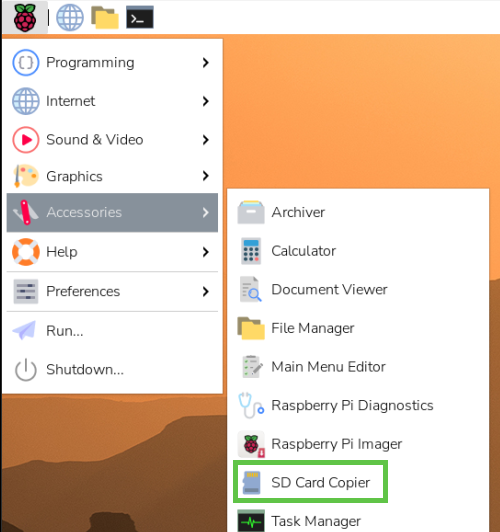
With the new version of the OS you can just use SD Card Copier from the accessories menu.
We assume that you have already imaged and are booted up with the SD Card.
1. Terminal
Open the terminal windows

Change the boot option with this command from the terminal window
sudo raspi-config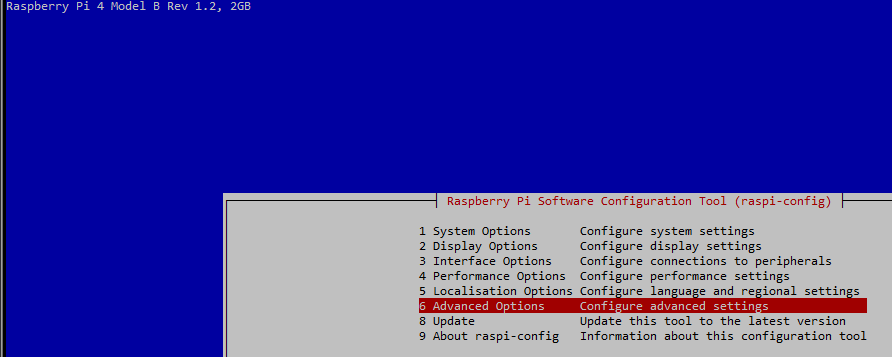
Then choose the option Boot Order
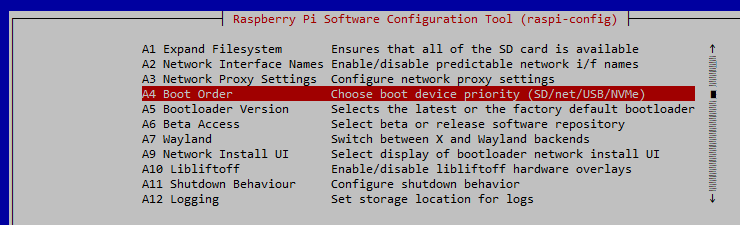
Then choose the option NVMe/USB Boot

From the Accessories menu, run the copier from you SD card to the SSD as this will copy you SD to your new SSD.
Then change the boot order back on the SD card to use on another device.
Follow the privious instructions but use this final option

Shutdown your Pi
sudo shutdownTake out your SD card before powering on
DEPRICATED
rpi-clone is on github and is downloaded by cloning the repository. It is a standalone script and the install is a simple copy to a bin directory. When run it checks its program dependencies and offers to install needed packages. But currently rpi-clone knows how to install only Debian packages with apt-get.
On a Raspberry Pi:
	$ git clone https://github.com/billw2/rpi-clone.git
	$ cd rpi-clone
	$ sudo cp rpi-clone rpi-clone-setup /usr/local/sbin
Clone to the drive you need the drive first with
lsblkThen clone to it
sudo rpi-clone sdaMake sure /usr/local/sbin is in your $PATH and then run rpi-clone or rpi-clone-setup with no args to print usage.
Get it HERE
Video HERE