# Linux Server - Install RedHat 8.6
## Summary
Instructions on the install and configuration of a Linux server for Kiwiplan.
### Details
#### Prerequisites
VMware, KVM, Hyper-V machine to host the installation
You will need to use the following command when you vi your files as you cut and paste:
Once in vi you have to hit the colon and then type “set paste”
```shell
:set paste
```
This will not mess with the paste you put in.
### Instructions
### Preparing the OS
This is to install the OS on a VmWare
### VMWare Setup using GUI
Boot ISO
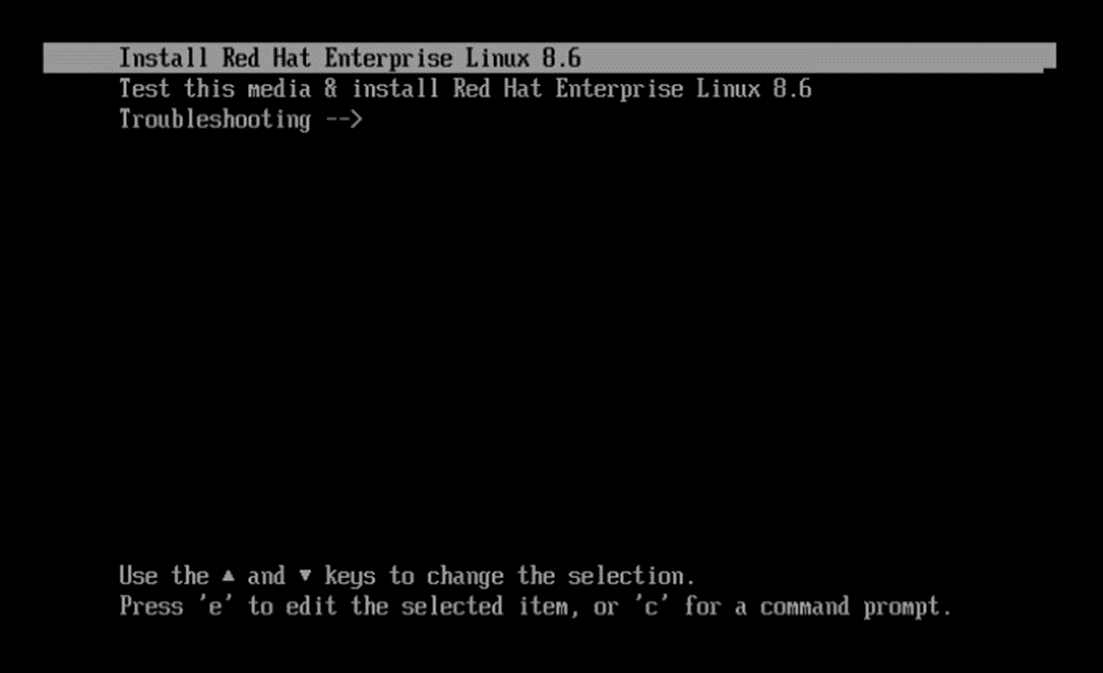
Select “Install RedHat Linux”
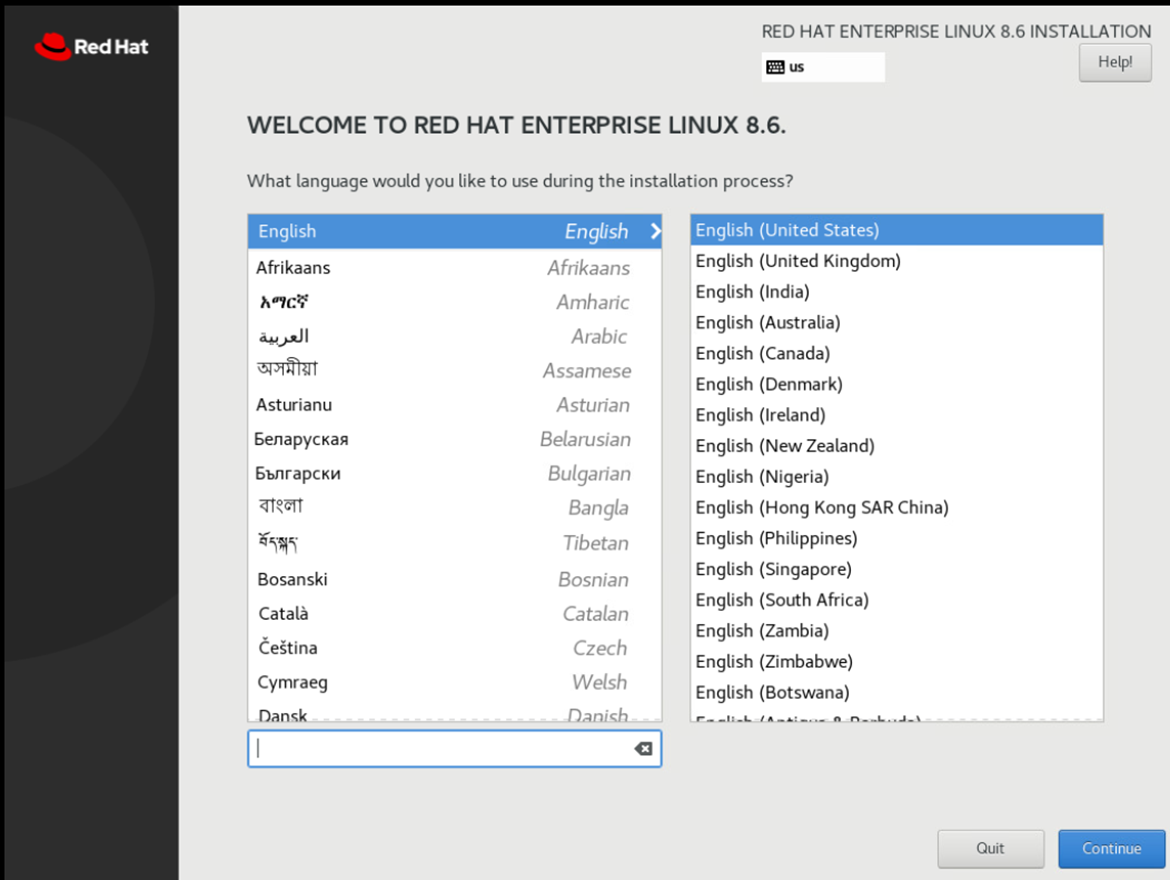
Select Language
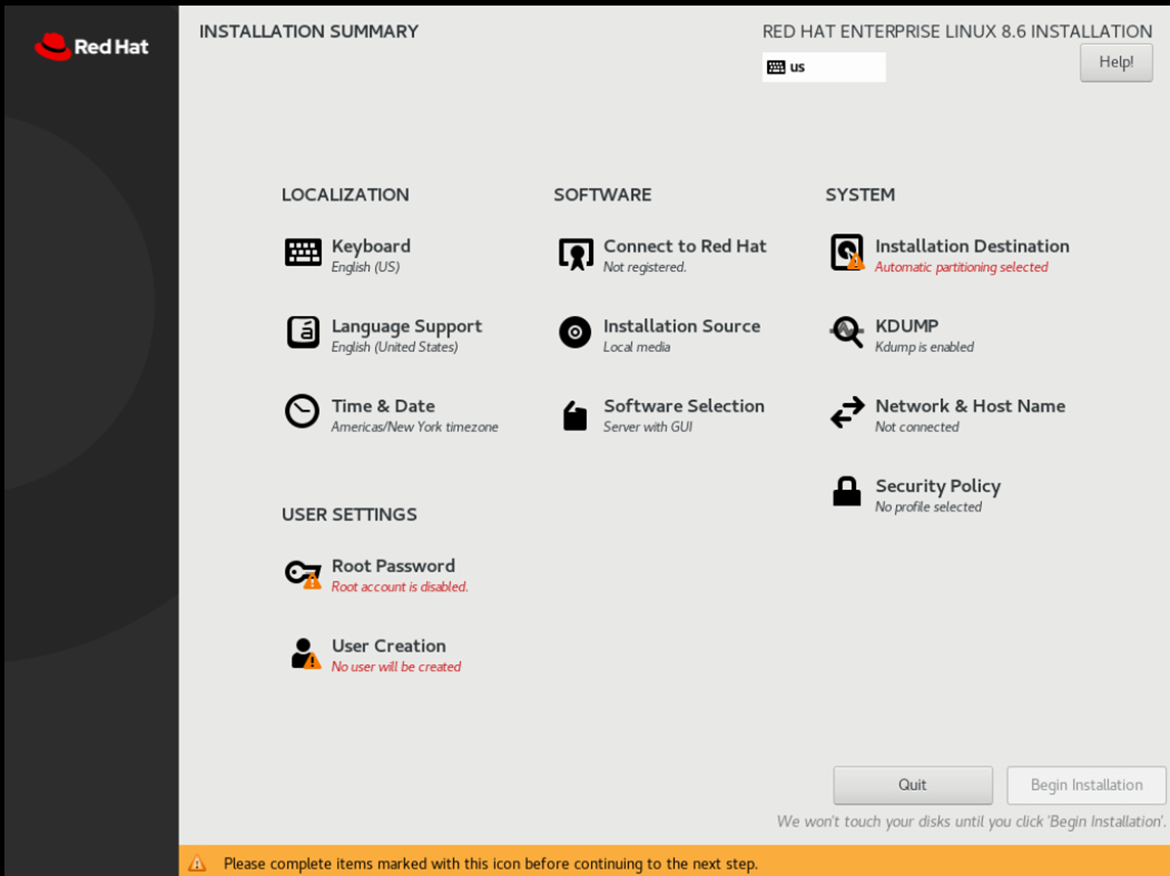
Then Select “Network & Hostname” from install menu.
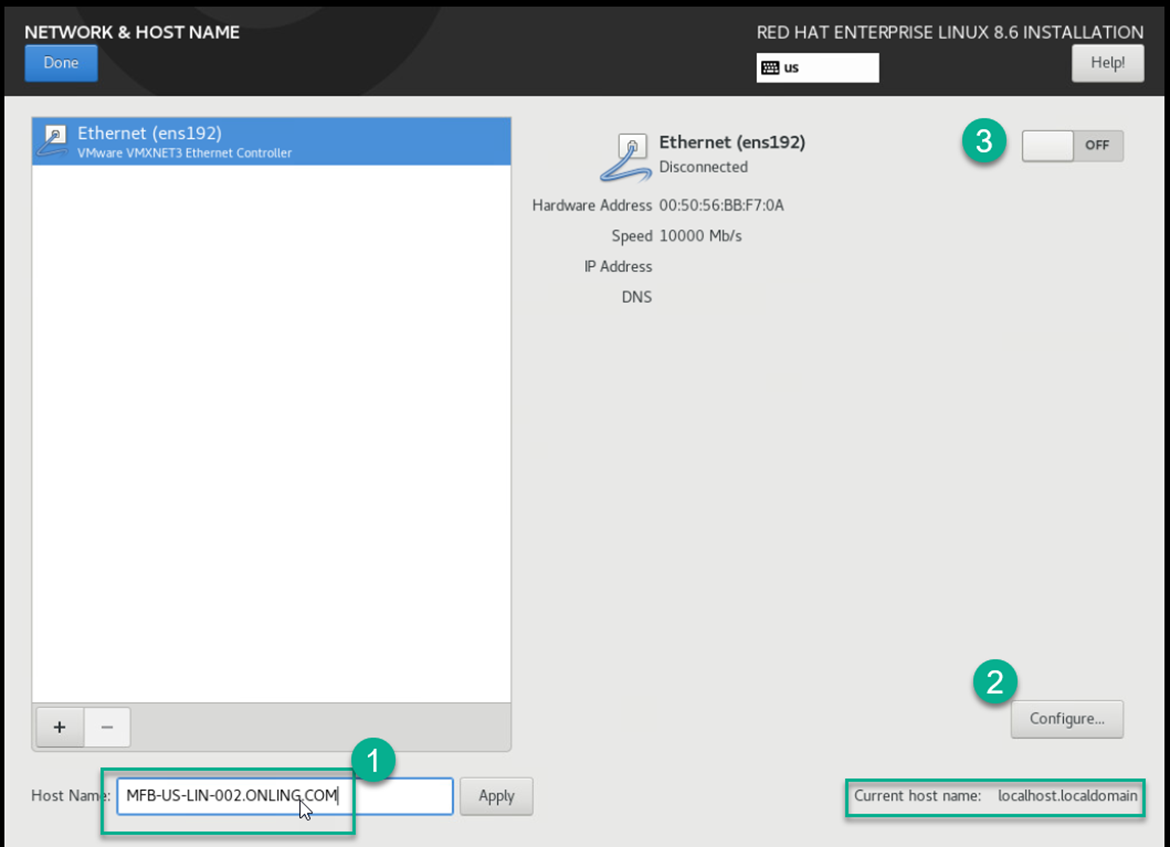
Set hostname and hit apply
Click Configure and set the IP
Click on IPv6 Settings and disable it
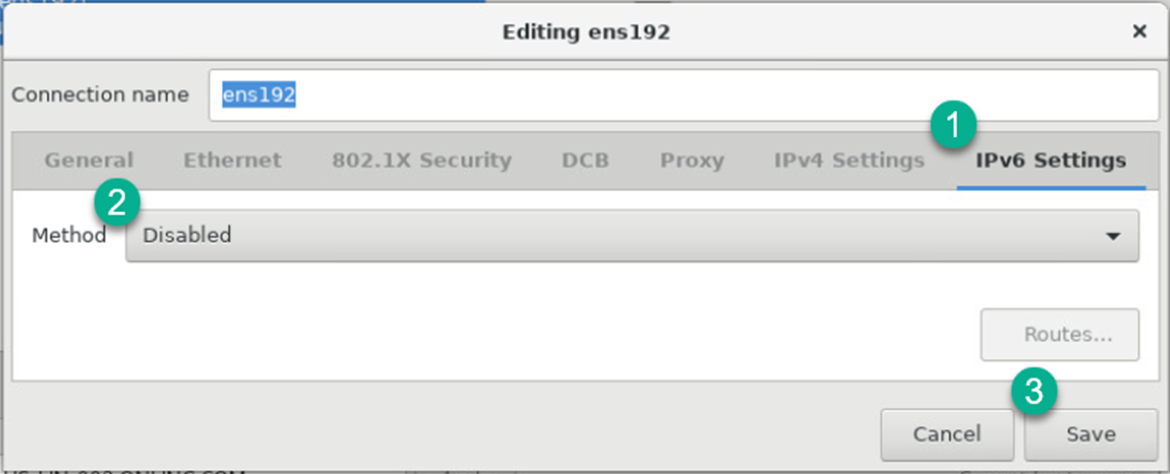
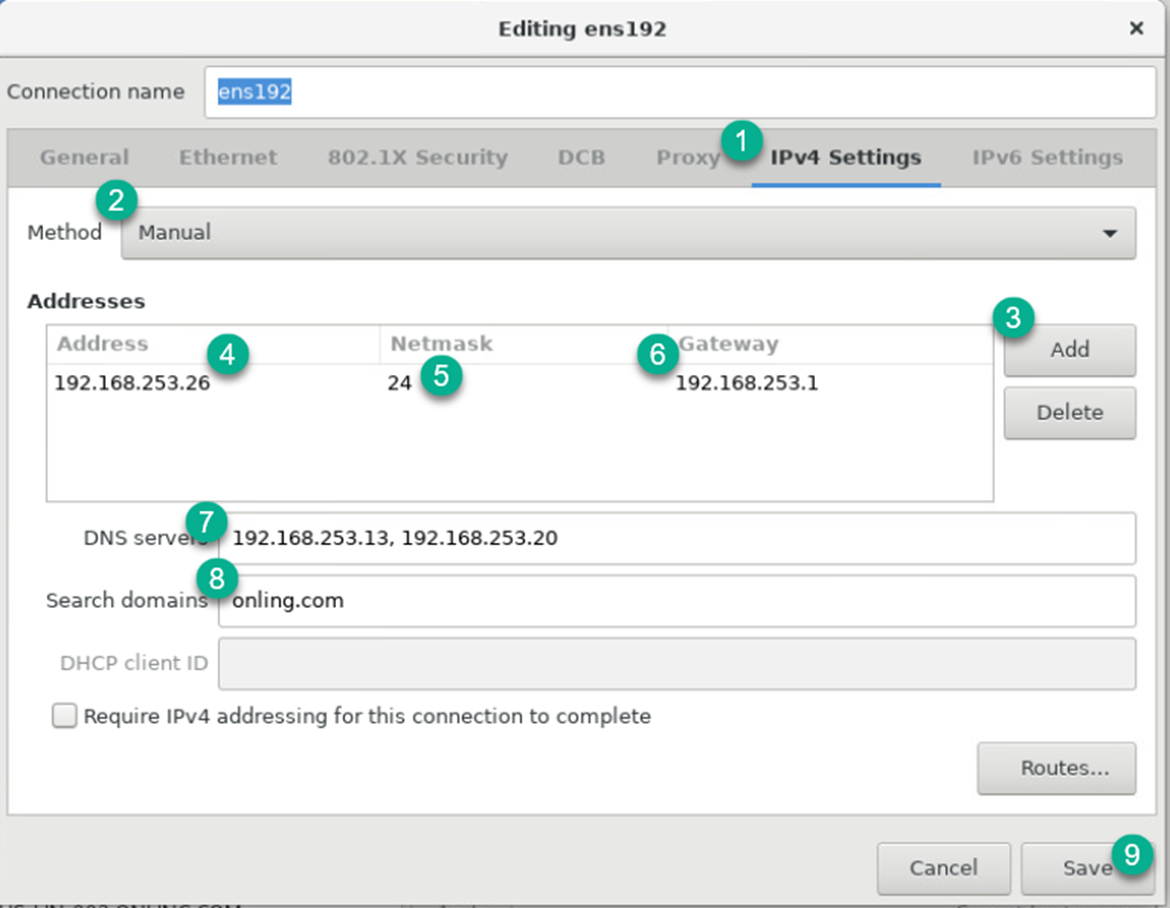
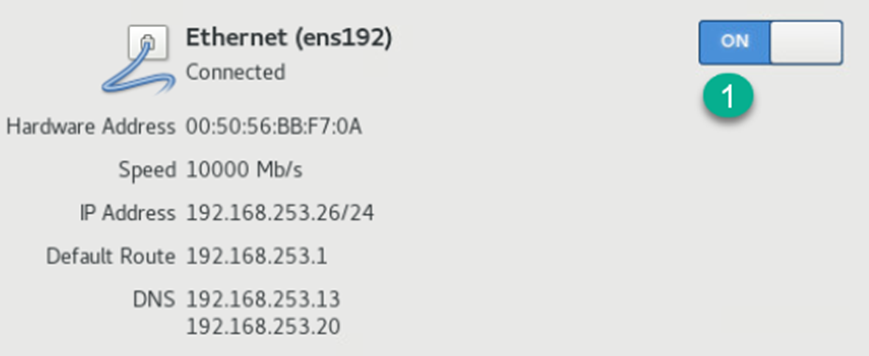
Register Redhat
[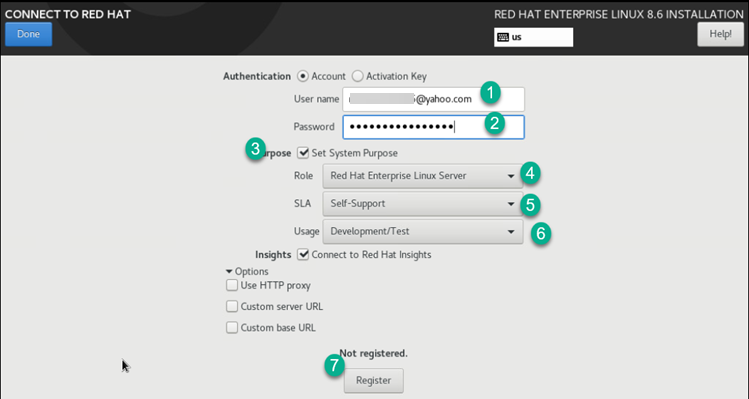](https://docs.sflservicesllc.com/uploads/images/gallery/2025-07/image.png)

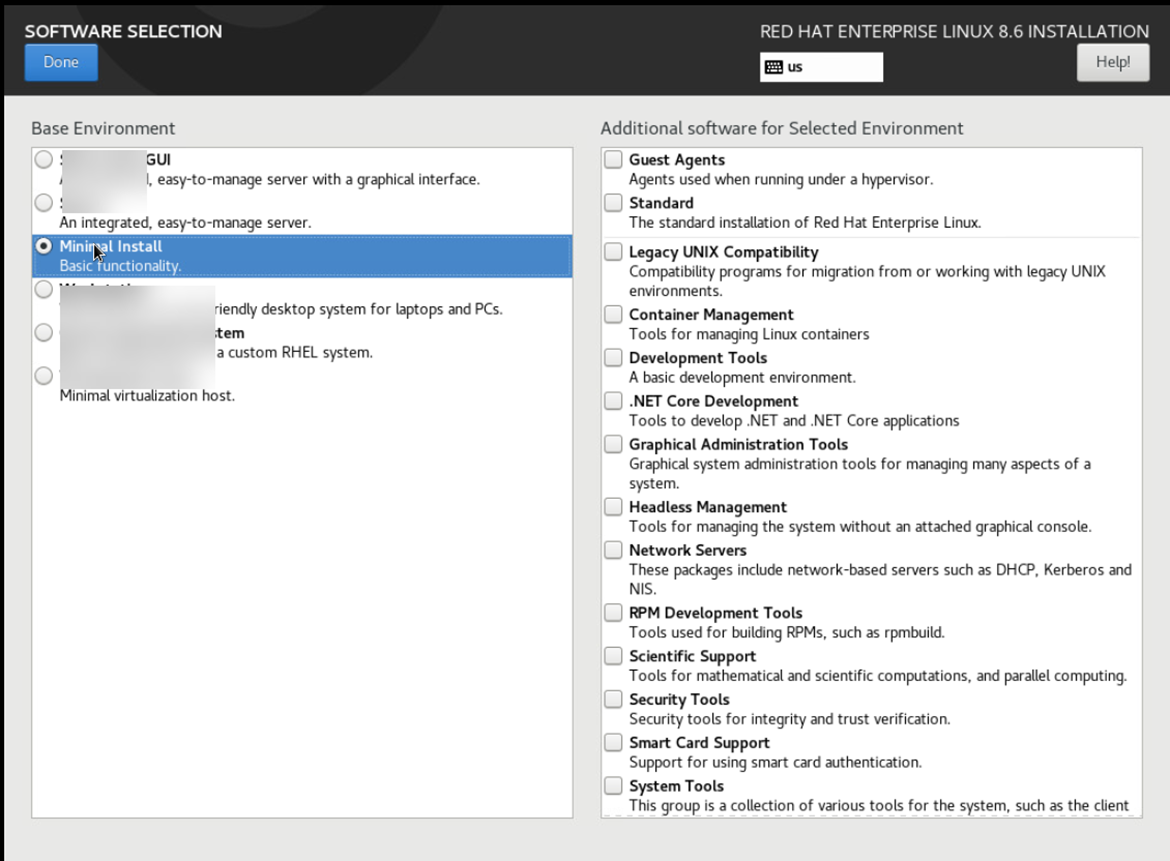
Software Selection
Select Minimal install with nothing else checked
Select “Installation Destination
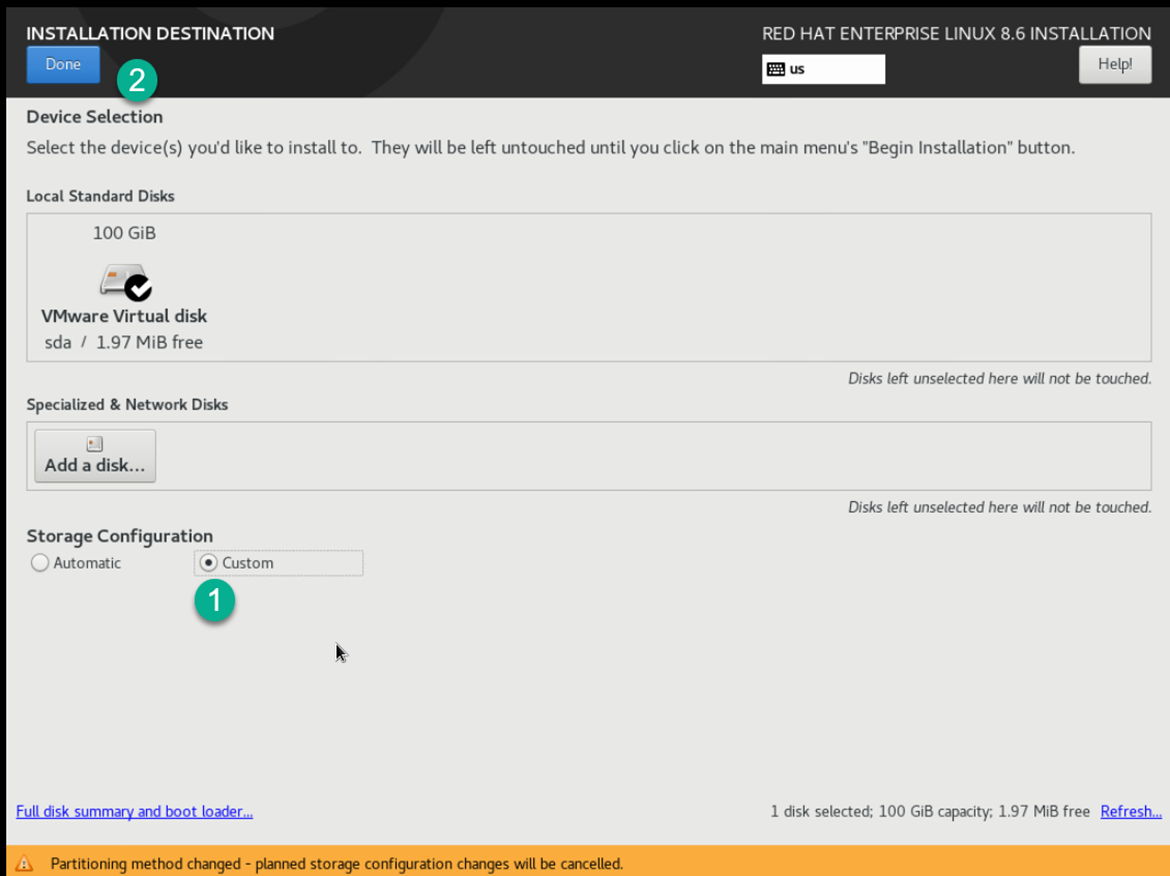
Make sure you select custom to configure the drives and click done
Click on the Hyper Link
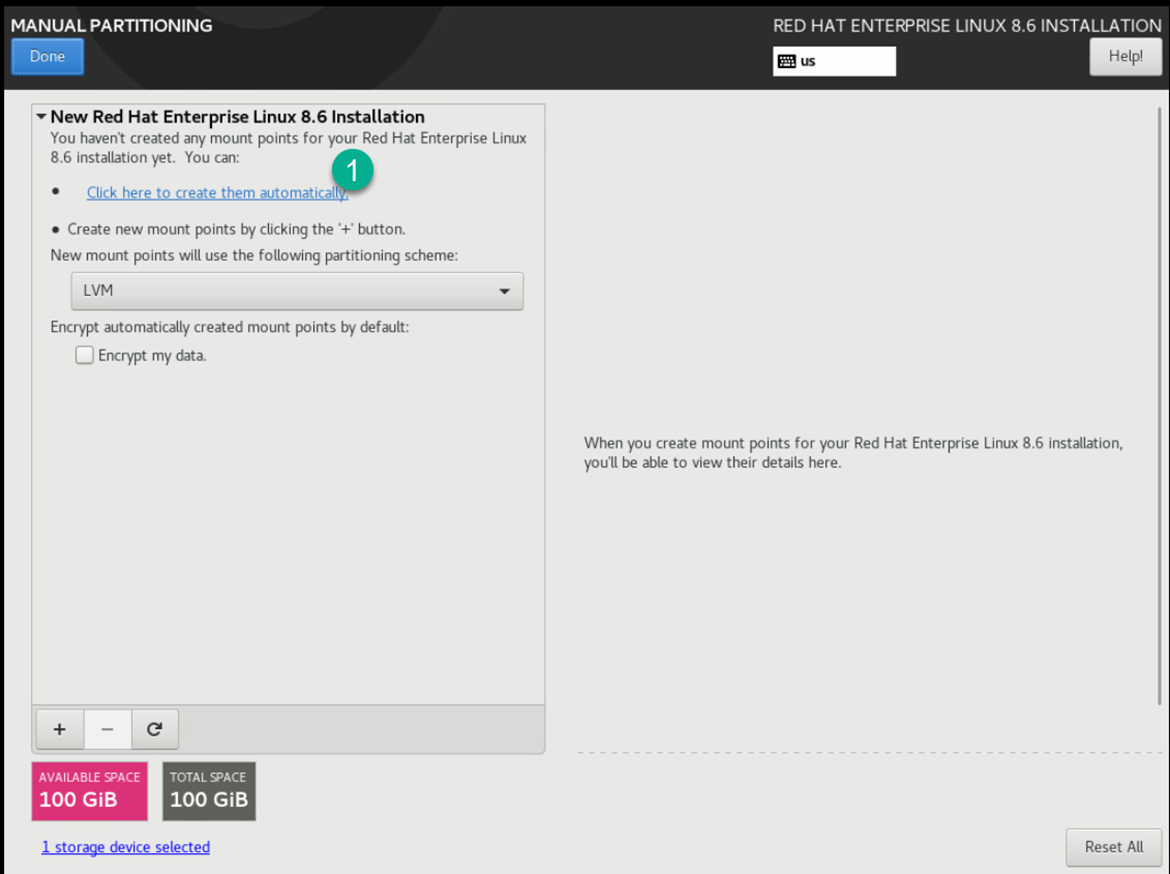
Click on the /home folder and then the minus sign
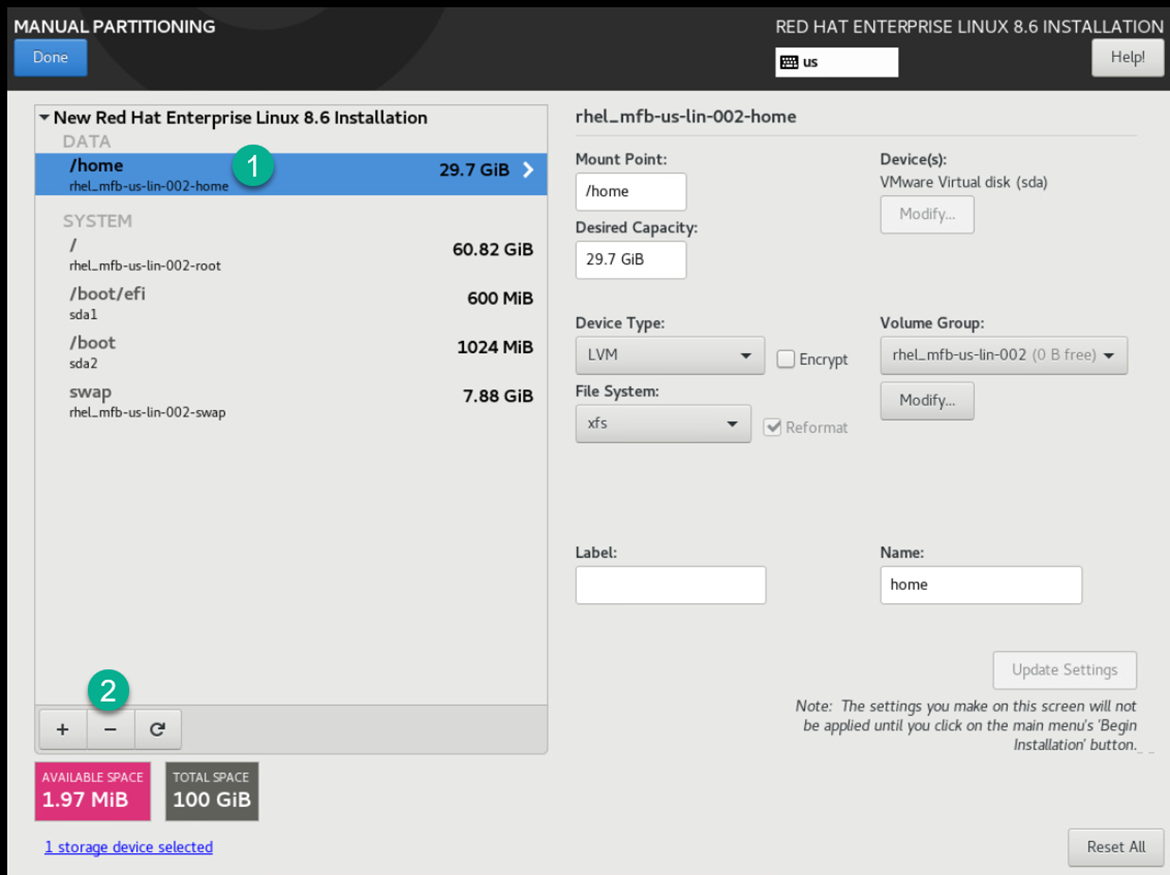
Enter the total original in the Desired Capacity
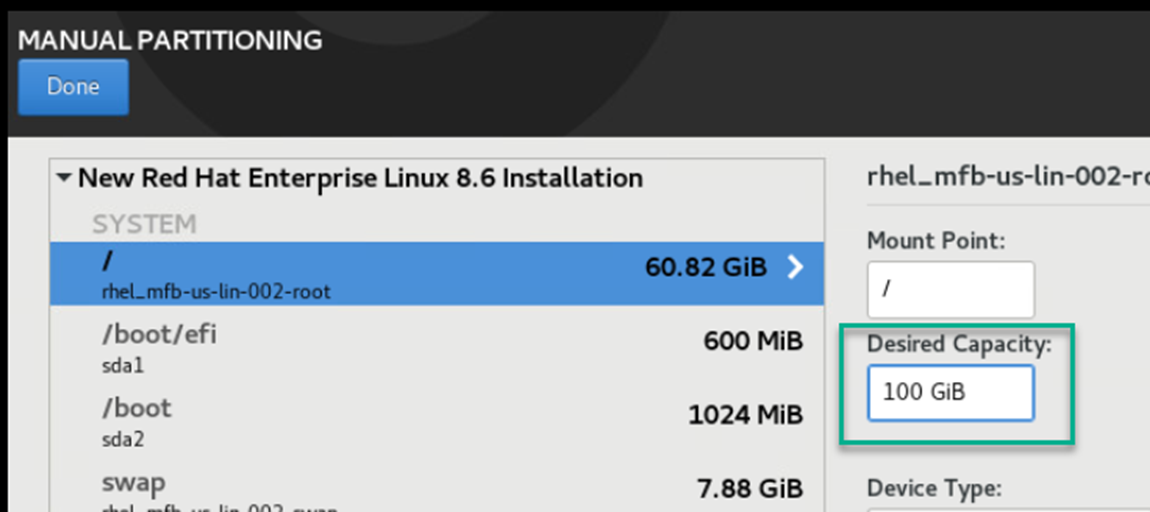
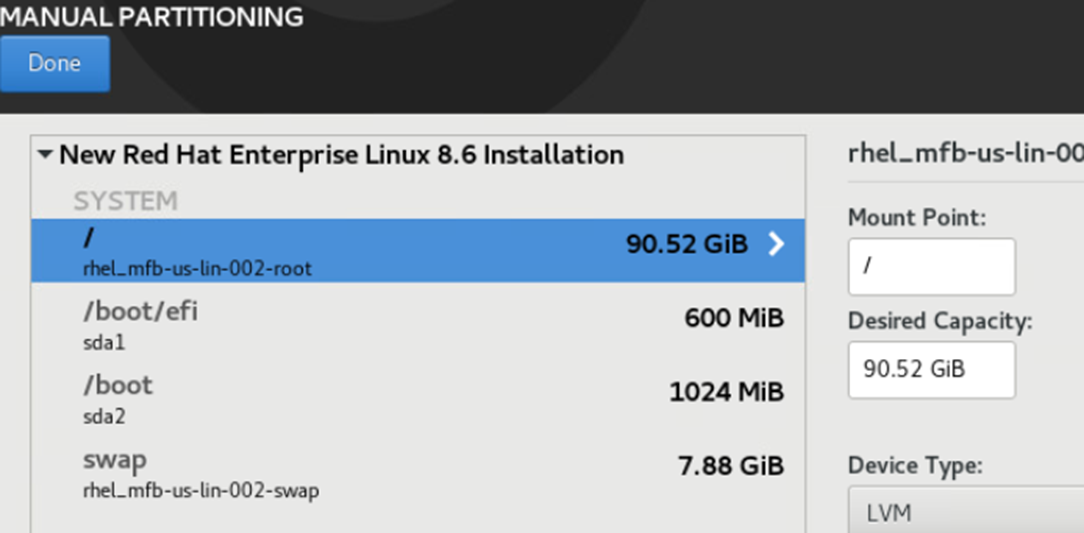
Click on any of the drives and the screen will recalculate the space to the “/” folder which is what we need.
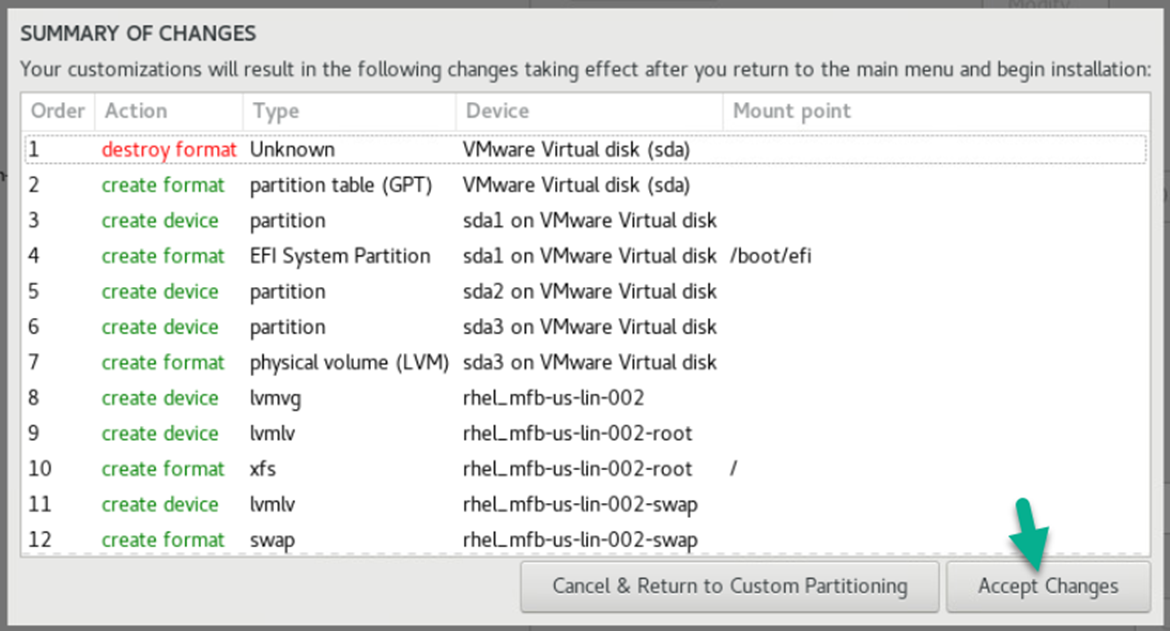
Accept Changes
Root Password
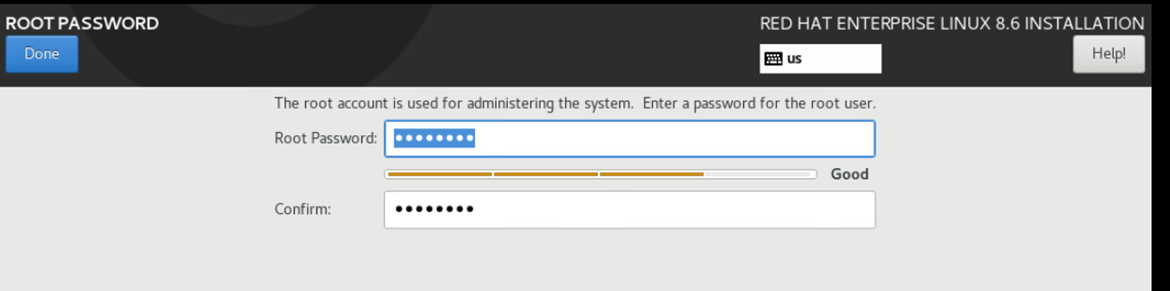
Set “root” Password
Click “Begin Installation”
When finished click on “Reboot System”
### Connect to the Server
Use a SSH connection to the server the remaining of the commands in order to cut and pates them in instead of using the VM interface.
### Commands to run
This will show all command that need to be ran to update within the OS to start the configuration.
All the command are within each box
#### Update the System
After install update system packages for the needed configuration.
```shell
dnf upgrade -y
```
Disable SeLinux
```shell
setenforce 0
sed -i 's/^SELINUX=.*/SELINUX=disabled/g' /etc/selinux/config
```
Optional: Manually adjust the file which is located here if you wish to edit manually
```shell
vi /etc/sysconfig/selinux
```
Disable firewall
```shell
systemctl disable firewalld.service
```
Epel Release
```bash
subscription-manager repos --enable codeready-builder-for-rhel-8-$(arch)-rpms
dnf install https://dl.fedoraproject.org/pub/epel/epel-release-latest-8.noarch.rpm
```
After Epel installation rerun the upgrade to update if any are needed
```shell
dnf upgrade -y
```
## Install core software
### Install Packages
#### Add the needed packages
Install required system packages
```shell
dnf install bind-utils bzip2 cups cifs-utils enscript ftp gdb ghostscript java-1.8.0-openjdk-headless java-11-openjdk-headless krb5-workstation ksh lftp lrzsz lsof libnsl lzop mariadb-server mlocate mutt ncompress net-tools net-snmp net-snmp-utils net-tools nfs-utils nmap nvme-cli openldap-clients openssh-clients psmisc realmd rsync samba-client strace sysstat tcpdump telnet telnet-server tmux unix2dos vim vim-enhanced vsftpd wget xfsdump vsftpd htop mc rsyslog rsyslog-doc postfix dbus-daemon s-nail dovecot cyrus-sasl cyrus-sasl-lib cyrus-sasl-plain tree figlet toilet coreutils -y
```
If you are running on a virtual machine run the following
```shell
dnf install open-vm-tools -y
sysctl vm.swappiness=10
```
Install vim color for scripting
```shell
dnf install git -y
git clone https://github.com/flazz/vim-colorschemes ~/.vim/
cp ~/.vim/colors/desert.vim /etc/vimrc.local
```
### Configure Installed Packages
#### Configure the packages
Enable Telnet run the following to enable and start the packages
```shell
systemctl enable telnet.socket
systemctl restart telnet.socket
```
Enable Time Synchronization run the the following and add your domain time server
```shell
vi /etc/chrony.conf
```
Add your server below the following and make sure you change the domain name from **sflservicesllc.com**
```shell
# These servers were defined in the installation:
#server _gateway iburst
server domain.sflserviesllc.com iburst
```
Enable Time Synchronization
```shell
systemctl enable --now chronyd
```
Note: Time-zone changes are made with the command
```shell
timedatectl
```
Enable FTP run the following
```shell
vi /etc/vsftpd/vsftpd.conf
```
Make the following changes within the file
```shell
anonymous_enable=NO
local_umask=002
ascii_upload_enable=YES
ascii_download_enable=YES
```
Start and Enable FTP for transfer in and out for us or other vendors
```shell
systemctl enable --now vsftpd.service
```
If you have a remote logging server setup then edit the following command
```shell
vi /etc/rsyslog.conf
```
Then add the following at the end of the file but make sure you update the IP address and replace the XXX's
```shell
*.* @192.168.XXX.XXX:514 # use @ for UDP Protocal
*.* @@192.168.XXX.XXX:514 # use @@ for TCP Protocal
```
Enable Rsyslog to enable logging locally and remotely
```shell
systemctl enable --now rsyslog
```
Configure Postfix for Email run the following
```shell
vi /etc/postfix/main.cf
```
Update the following with your email server
```shell
relayhost = [ENTER IP or SMTP SERVER] or [sflservicesllc-com.mail.protection.outlook.com]:25
```
Optional if you want to hardcode a domain name run the following
```shell
vi /etc/postfix/main.cf
```
Update the following with a remote or local email server and make sure you change the domain name from **sflservicesllc.com**
```shell
myhostname = sflservicesllc.com
mydomain = sflservicesllc.com
mydestination =
relayhost = [ENTER IP or SMTP SERVER] or [sflservicesllc-com.mail.protection.outlook.com]:25
```
Optional f you do not have a email remote/local server
```shell
vi /etc/postfix/main.cf
```
Update the following for no email server and make sure you change the domain name from **sflservicesllc.com**
```
myhostname = sflservicesllc.com
mydomain = sflservicesllc.com
mail_spool_directory = /var/mail
mynetworks = 127.0.0.0/8, 168.100.189.0/28
```
Enable Postfix
```shell
systemctl enable --now postfix
```
Test your config this way
```shell
echo "Install of Linux Rocks $HOSTNAME" | sendmail steve.ling@sflservicesllc.com
```
Locale add-ons to make sure that ANSI applications display correctly so edit the following and replace all of the values with the following
Edit the following:
```shell
vi /etc/locale.conf
```
Change the following:
```shell
sudo cat > /etc/locale.conf << EOF
LANG="en_US"
SUPPORTED="en_GB:en_GB-.UTF-8:en_US:en_US.UTF-8:de_DE:de_DE.UTF-8"
SYSFONT="latarcyrheb-sun16"
EOF
```
Once added the locals exit and telnet back into the server to take the update
### Bash colors and Prompt
Bash for root for color edit the following
Dependent on
```bash
dnf install figlet toilet -y
```
Creating Aliases
```bash
sudo cat > /etc/profile.d/custom-aliases.sh << EOF
# Common interactive aliases for all users
alias rm='rm -i'
alias cp='cp -i'
alias mv='mv -i'
alias vi='vim'
alias tailf='tail -f'
EOF
```
Server Warning
```bash
sudo tee /etc/profile.d/custom-prod-warning.sh > /dev/null << 'EOF'
# Colorful PRODUCTION warning banner for interactive logins
if [[ -n "$PS1" && -t 0 && -t 1 ]]; then # Interactive terminal with stdin/stdout
RED='\033[1;31m' # Bold red
YELLOW='\033[1;33m' # Bold yellow
NC='\033[0m' # No color
echo
if command -v figlet >/dev/null 2>&1; then
figlet -f big "PRODUCTION" | while IFS= read -r line; do
printf '%b%s%b\n' "$RED" "$line" "$NC"
done
figlet -f big "SERVER" | while IFS= read -r line; do
printf '%b%s%b\n' "$RED" "$line" "$NC"
done
else
echo -e "${RED}***** PRODUCTION SERVER!! *****${NC}"
fi
echo
echo -e "${YELLOW} *** EXTREME CAUTION REQUIRED ***${NC}"
echo -e "${RED}This is a LIVE PRODUCTION system.${NC}"
echo -e "${RED}Unauthorized access is strictly prohibited.${NC}"
echo -e "${RED}All activity is logged and monitored.${NC}"
echo -e "${YELLOW}Think twice before running commands!${NC}"
echo
# Pause briefly to ensure user sees the warning
read -t 5 -p "Press Enter to continue (auto-continue in 5 seconds)... " || true
echo
fi
EOF
```
Creating Colorful Prompts
```bash
sudo tee /etc/profile.d/custom-prompt-and-colors.sh > /dev/null << 'EOF'
# Custom LS_COLORS and improved multi-line colored prompt
# Vibrant LS_COLORS (directories bold blue on gray, etc.)
LS_COLORS='rs=0:di=01;44:ln=01;36:mh=00:pi=40;33:so=01;35:do=01;35:bd=40;33;01:cd=40;33;01:or=40;31;01:su=37;41:sg=30;43:ca=30;41:tw=30;42:ow=34;42:st=37;44:ex=01;32:*.tar=01;31:*.tgz=01;31:*.arj=01;31:*.taz=01;31:*.lzh=01;31:*.lzma=01;31:*.tlz=01;31:*.txz=01;31:*.zip=01;31:*.z=01;31:*.Z=01;31:*.dz=01;31:*.gz=01;31:*.lz=01;31:*.xz=01;31:*.bz2=01;31:*.bz=01;31:*.tbz=01;31:*.tbz2=01;31:*.tz=01;31:*.deb=01;31:*.rpm=01;31:*.jar=01;31:*.rar=01;31:*.ace=01;31:*.zoo=01;31:*.cpio=01;31:*.7z=01;31:*.rz=01;31:*.jpg=01;35:*.jpeg=01;35:*.gif=01;35:*.bmp=01;35:*.pbm=01;35:*.pgm=01;35:*.ppm=01;35:*.tga=01;35:*.xbm=01;35:*.xpm=01;35:*.tif=01;35:*.tiff=01;35:*.png=01;35:*.svg=01;35:*.svgz=01;35:*.mng=01;35:*.pcx=01;35:*.mov=01;35:*.mpg=01;35:*.mpeg=01;35:*.m2v=01;35:*.mkv=01;35:*.ogm=01;35:*.mp4=01;35:*.m4v=01;35:*.mp4v=01;35:*.vob=01;35:*.qt=01;35:*.nuv=01;35:*.wmv=01;35:*.asf=01;35:*.rm=01;35:*.rmvb=01;35:*.flc=01;35:*.avi=01;35:*.fli=01;35:*.flv=01;35:*.gl=01;35:*.dl=01;35:*.xcf=01;35:*.xwd=01;35:*.yuv=01;35:*.cgm=01;35:*.emf=01;35:*.axv=01;35:*.anx=01;35:*.ogv=01;35:*.ogx=01;35:*.aac=00;36:*.au=00;36:*.flac=00;36:*.mid=00;36:*.midi=00;36:*.mka=00;36:*.mp3=00;36:*.mpc=00;36:*.ogg=00;36:*.ra=00;36:*.wav=00;36:*.axa=00;36:*.oga=00;36:*.spx=00;36:*.xspf=00;36:'
export LS_COLORS
# Color and style variables (cached tput calls for speed)
RESET=$(tput sgr0)
BOLD=$(tput bold)
BG_GRAY=$(tput setab 8)
FG_RED=$(tput setaf 1)
FG_MAGENTA=$(tput setaf 5)
FG_GREEN=$(tput setaf 2)
FG_CYAN=$(tput setaf 6)
# Multi-line prompt
PS1="\n${BOLD}${BG_GRAY}${FG_RED}\\u${FG_MAGENTA}@${FG_RED}\`hostname\`${FG_GREEN} : \`uname\` : ${FG_CYAN}\\d \\t : \${PLANTID:+\$PLANTID }\n${FG_CYAN}[\\w]${RESET}${BOLD} \\\$ ${RESET}"
export PS1
EOF
```
### Database Install and Configuration
### Configure MariaDB
Optional: To add the MariadB repo to get the latest revision other then the one that is included in the RedHat
MySQL/MariaDB reported a problem with 10.5, you should consider upgrading to 10.6
Install the new Repo for MariaDB
```bash
curl -sS https://downloads.mariadb.com/MariaDB/mariadb_repo_setup | sudo bash
```
This is the location of
```bash
vi /etc/yum.repos.d/MariaDB.repo
```
You have to change the yellow below to get the desired version
| \[mariadb\]
name = MariaDB
baseurl = https://rpm.mariadb.org/10.6/rhel/$releasever/$basearch
gpgkey= https://rpm.mariadb.org/RPM-GPG-KEY-MariaDB
gpgcheck=1 |
Done with Optional
Run the following
```shell
systemctl edit mariadb.service
```
Then add the following to the file in between these lines or if blank just add and save
```shell
### Editing /etc/systemd/system/mariadb.service.d/override.conf
### Anything between here and the comment below will become the new contents of the file
[Service]
LimitNOFILE=32768
### Lines below this comment will be discarded
```
Run the following
```shell
vi /etc/my.cnf.d/client.cnf
```
Add the following below the **\[client\]** section
```shell
socket=/var/lib/mysql/mysql.sock
```
Run the following
```shell
vi /etc/my.cnf.d/mariadb-server.cnf
```
Add the following below the **\[mysqld\]** section and you will have to use the **:set paste** command or it will not paste correctly
```shell
#Custom
performance_schema = ON
tmpdir = /run/mariadb
thread_cache_size = 4
table_open_cache = 16384
table_definition_cache = 8384
sql_mode = ERROR_FOR_DIVISION_BY_ZERO,NO_AUTO_CREATE_USER,NO_ENGINE_SUBSTITUTION
query_cache_type = 0
query_cache_size = 0
query_cache_limit = 128M
query_cache_strip_comments = 1
tmp_table_size = 512M
max_heap_table_size = 512M
max_connections = 512
max_allowed_packet = 24M
sort_buffer_size = 24M
join_buffer_size = 48M
innodb_buffer_pool_size = 4G
innodb_buffer_pool_instances = 4
innodb_use_native_aio = 1
innodb_flush_log_at_trx_commit = 0
innodb_file_per_table
innodb_log_file_size = 512M
#Optional configuration for transaction loggin
log_bin = /var/log/mariadb/mariadb.log
expire_logs_days = 2
```
Reload the changes
```shell
systemctl daemon-reload
```
Enable and start MySQL/MariaDB on boot
```shell
systemctl enable --now mariadb.service
```
Run the following
```shell
mysql
```
Then execute the following statements also make sure to (**change passwords as needed XXXXXXXXXX but NOT the users names**)
```shell
CREATE USER 'kiwisql'@'%' IDENTIFIED BY 'XXXXXXXXXX';
GRANT all ON *.* TO 'kiwisql'@'%' WITH GRANT OPTION;
CREATE USER 'kiwisql'@'localhost' IDENTIFIED BY 'XXXXXXXXXX';
GRANT all ON *.* TO 'kiwisql'@'localhost' WITH GRANT OPTION;
CREATE USER 'kiwilive'@'localhost' IDENTIFIED BY 'XXXXXXXXXX';
GRANT all ON *.* TO 'kiwilive'@'localhost';
CREATE USER 'remuser'@'localhost' IDENTIFIED BY 'XXXXXXXXXX';
GRANT all ON *.* TO 'remuser'@'localhost' WITH GRANT OPTION;
CREATE USER 'reports'@'%' IDENTIFIED BY 'XXXXXXXXXX';
GRANT SHOW DATABASES, SELECT, EXECUTE, PROCESS, SHOW VIEW ON *.* TO 'reports'@'%';
FLUSH PRIVILEGES;
Quit
```
### Build skeleton for the Kiwiplan Environment
### Command to Run
Setup the user environment
Remember to change the **remuser** & **esp** password
ESP username password is the global password store in ESP to let it connect and is *unfortunately *visible to an admin user but please make sure to (**change passwords as needed XXXXXXXXXX but NOT the users names**)
```
groupadd kiwiplan
mkdir /opt/kiwi
ln -s /opt/kiwi/ /KIWI
mkdir /opt/kiwi/{home,rev}
mkdir /opt/kiwi/rev/{map,mes}
useradd -g kiwiplan -G wheel -d /KIWI/home/remuser/ remuser
echo XXXXXXXXXX | passwd --stdin remuser
useradd -g kiwiplan -d /KIWI/home/esp/ esp
echo XXXXXXXXXX | passwd --stdin esp
chown -R remuser:kiwiplan /opt/kiwi
mkdir /etc/kiwiplan
chown remuser:kiwiplan /etc/kiwiplan
```
### Configure kidds
Remember your **:set paste** command
Edit xinetd.conf:
```bash
vi /etc/xinetd.conf
```
Add the following ad the end of the # Define access restriction defaults section
```bash
instances = 200
per_source = 80
```
Should look like this:
| \#
\# This is the master xinetd configuration file. Settings in the
\# default section will be inherited by all service configurations
\# unless explicitly overridden in the service configuration. See
\# xinetd.conf in the man pages for a more detailed explanation of
\# these attributes.
defaults
{
\# The next two items are intended to be a quick access place to
\# temporarily enable or disable services.
\#
\# enabled =
\# disabled =
\# Define general logging characteristics.
log\_type = SYSLOG daemon info
log\_on\_failure = HOST
log\_on\_success = PID HOST DURATION EXIT
\# Define access restriction defaults
\#
\# no\_access =
\# only\_from =
\# max\_load = 0
cps = 50 10
instances = 200
per\_source = 80
\# Address and networking defaults
\#
\# bind =
\# mdns = yes
v6only = no
\# setup environmental attributes
\#
\# passenv =
groups = yes
umask = 002
\# Generally, banners are not used. This sets up their global defaults
\#
\# banner =
\# banner\_fail =
\# banner\_success =
}
includedir /etc/xinetd.d
|
Append to end of the services:
```bash
kidd 2326/tcp # Kiwiplan Interface Daemon
```
Run the following to add the kidds service:
```bash
sudo tee /etc/xinetd.d/kidd <The above will only work once you have the Kiwiplan environment configured/installed
### VUE Installation Configurations
### Adjust system limits for VUE products
Edit the following
```shell
vi /etc/security/limits.d/20-nproc.conf
```
Add the following
```shell
@kiwiplan soft nproc 32768
```
Edit the following
```shell
vi /etc/security/limits.conf
```
Then add the following before the **\#End of file**
```shell
@kiwiplan - nofile 32768
```
### Installing MsSQL Tool
#### Configure MsSQL tools
Install the repo for the MsSQL service/connection
```shell
curl https://packages.microsoft.com/config/rhel/8/prod.repo > /etc/yum.repos.d/msprod.repo
```
This will only work once you have the Kiwiplan environment configured/installed
Install the packages make sure you answer/type **YES** to all
```shell
dnf remove mssql-tools unixODBC-utf16-devel
dnf install mssql-tools unixODBC-devel -y
```
## STOP HERE FOR YOUR TEMPLATE BUILD
## RESTART FROM HERE AFTER TEMPLATE BUILD
#### Linux RedHat Registration
Re-Register the server with RedHat if you entered initial credentials to add the server
You need to run the **nmtui** command to bring up the menu from above in this documentation and then simply change the IP and also the hostname
Run the following and this will change the subscription details
```shell
subscription-manager register --force
subscription-manager attach --auto
```
### Activate Directory Setup
#### Using SSSD
Install the following packages
```shell
yum install sssd sssd-tools realmd samba-common-tools oddjob oddjob-mkhomedir adcli samba -y
```
Run this just in-case your domain is still using RC4
```shell
update-crypto-policies --set DEFAULT:AD-SUPPORT
```
#### Configure KRB5
Edit the following file and make sure the following is added/changed
```shell
vi /etc/krb5.conf
```
Add or changed the following below
| \# To opt out of the system crypto-policies configuration of krb5, remove the
\# symlink at /etc/krb5.conf.d/crypto-policies which will not be recreated.
includedir /etc/krb5.conf.d/
\[logging\]
default = FILE:/var/log/krb5libs.log
kdc = FILE:/var/log/krb5kdc.log
admin\_server = FILE:/var/log/kadmind.log
\[libdefaults\]
dns\_lookup\_realm = true
ticket\_lifetime = 24h
renew\_lifetime = 7d
forwardable = true
rdns = true
pkinit\_anchors = FILE:/etc/pki/tls/certs/ca-bundle.crt
spake\_preauth\_groups = edwards25519
dns\_canonicalize\_hostname = fallback
qualify\_shortname = ""
default\_realm = ONLING.COM
default\_ccache\_name = KEYRING:persistent:%{uid}
udp\_preference\_limit = 0
\[realms\]
ONLING.COM = {
kdc = domain\_controller..onling.com
admin\_server = domain\_controller..onling.com
}
\[domain\_realm\]
.onling.com = ONLING.COM
onling.com = ONLING.COM
|
#### Join the server to the domain
Configurating the SSSD (in yellow update to site specific) (in green needs to be capitalized)
You must have the access to add to the AD server or the server has to be add first before you run the following command.
For the join you may need to specify the -OU's for the specific location
| \# realm discover onling.com
\# realm join -U [administrator@ONLING.COM](mailto:administrator@ONLING.COM) --verbose domain\_controller.onling.com
\# authselect select sssd with-mkhomedir
\# authselect apply-changes |
Copy from below and make changes
```shell
realm discover onling.com
realm join -U administrator@ONLING.COM --verbose domain_controller.onling.com
authselect select sssd with-mkhomedir
authselect apply-changes
```
#### Update SSSD config
Once joined then you can change or add the following parameters
```shell
vi /etc/sssd/sssd.conf
```
|
\[sssd\]
domains = onling.com
config\_file\_version = 2
services = nss, pam
\[domain/onling.com\]
default\_shell = /bin/bash
ad\_server = sfl-dom-001.onling.com
krb5\_store\_password\_if\_offline = True
cache\_credentials = True
krb5\_realm = ONLING.COM
realmd\_tags = manages-system joined-with-adcli
id\_provider = ad
fallback\_homedir = /home/%d/%u
ad\_domain = onling.com
use\_fully\_qualified\_names = false
ldap\_id\_mapping = True
access\_provider = ad
override\_gid = 1000
ad\_gpo\_ignore\_unreadable = true
ad\_gpo\_access\_control = disabled
timeout = 300
|
Restarting SSSD
```shell
systemctl stop sssd; sss_cache -E; systemctl start sssd
```
### Optional SSSD configurations
#### Defaults to no Shell Access, allows short usernames
Optional (Group allow) additional parameters and changes
| simple\_allow\_groups = sssd-users
OR
simple\_allow\_groups = gg-C3193???-KiwiTS\_access
|
#### Add users to SSSD
Optional grant shell access and force primary group to kiwiplan, change john.doe to the username
```shell
sss_override user-add john.doe -g $(getent group kiwiplan | cut -d: -f3) -s /bin/bash -h /KIWI/home/john.doe
```