# Kiwiplan - Farmout Routes in ESP
## **Farm-Out Routes in ESP**
### Warehoused Product Designs
## These 5 Farm Out route scenarios have at least these operations
| **Below - PCS Classic** | **Below - PCS VUE** |
[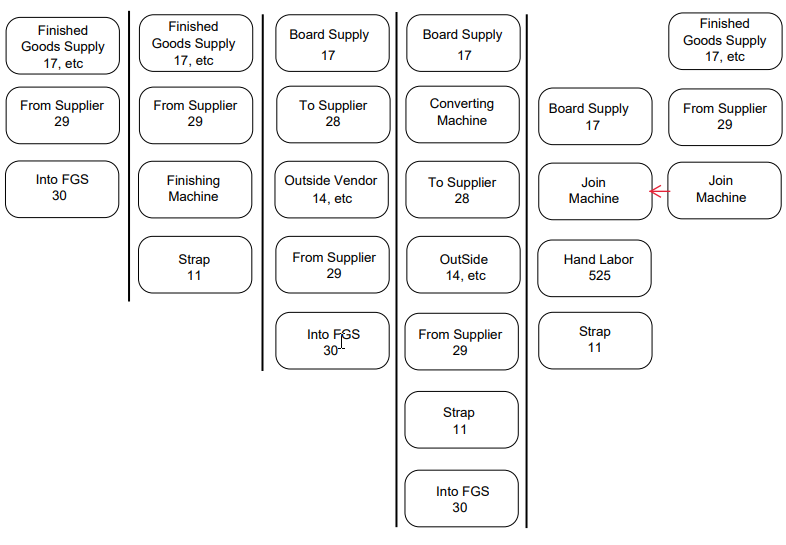](https://docs.sflservicesllc.com/uploads/images/gallery/2025-01/image.png)
| **Above - PCS Classic** | **Above - PCS VUE** |
#### How To and Explanation:
**If no route appears after saving PD**
1. Drag & drop machine into route.
- Drop once on Green
2. Right click in Blue, Assign Operations
3. In **Misc Details (2)** Tab, ensure all operations correlate with their respective bubble.
**If a route appears after saving PD**
1. Make appropriate changes to machines to how your item is being produced.
- Delete & Add Machines
- Choose Machines from Machine list
2. Right click in Blue, Assign Operations
3. In **Misc Details (2)** Tab, ensure all operations correlate with their respective bubble.