MsSQL - Restore Master/Model/MSDB
Steps to Restore the master Database:
-
Stop the SQL Server Instance:
- Open SQL Server Configuration Manager or Windows Services.
- Locate the SQL Server service (e.g.,
SQL Server (MSSQLSERVER)for a default instance). - Stop the service.
-
Start SQL Server in Single-User Mode:
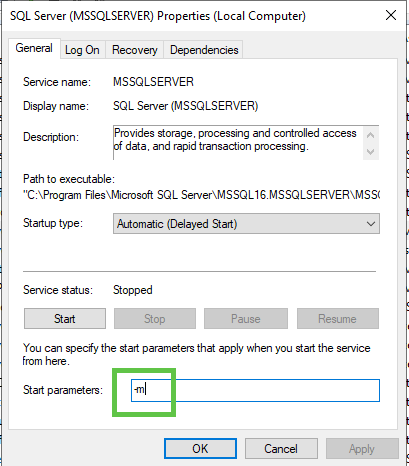
- Open the SQL Server service properties (e.g., by double-clicking the service in Services).
- Go to the "Startup Parameters" tab.
- Add
-m(for single-user mode) to the existing startup parameters. If there are existing parameters, separate them with a semicolon. - Start the SQL Server service from there
-
Connect using
sqlcmd:- Open a new Command Prompt window as Administrator.
- Navigate to the SQL Server Binn directory (e.g.,
C:\Program Files\Microsoft SQL Server\MSSQLXX.MSSQLSERVER\MSSQL\Binn). - Connect to the SQL Server instance using
sqlcmdin single-user mode. For a default instance, use:
sqlcmd -S . -E -d master
sqlcmd -S . -U sa - P PASSWORD -d master
For a named instance, replace . with .\<InstanceName>
- Restore the
masterDatabase:- In the
sqlcmdprompt, execute the followingRESTORE DATABASEcommand, replacing<path_to_backup_file>with the actual path to yourmasterdatabase backup file:
- In the
RESTORE DATABASE master FROM DISK = '\\192.168.1.61\Backups\UNIBCESRV02\master\FULL\UNIBCESRV02_master_FULL_20250910_010011.bak' WITH REPLACE, RECOVERY;
RESTORE DATABASE model FROM DISK = '\\192.168.1.61\Backups\UNIBCESRV02\model\FULL\UNIBCESRV02_model_FULL_20250910_010013.bak' WITH REPLACE, RECOVERY;
RESTORE DATABASE msdb FROM DISK = '\\192.168.1.61\Backups\UNIBCESRV02\msdb\FULL\UNIBCESRV02_msdb_FULL_20250910_010014.bak' WITH REPLACE, RECOVERY;
Check integrity
DBCC CHECKDB ('master') WITH ALL_ERRORMSGS, EXTENDED_LOGICAL_CHECKS;- The
WITH REPLACEoption is crucial as it overwrites the existingmasterdatabase. - The
RECOVERYoption brings the database online after the restore. - Restart SQL Server in Normal Mode:
- After the restore completes and
sqlcmdindicates the instance is shutting down, stop the SQL Server service again. - Remove the
-mstartup parameter from the SQL Server service properties. - Start the SQL Server service normally.
- After the restore completes and