Database Toolset
Toolset of tools and script for maintaining the databases. We also included scripts for different applications.
Copyright Notice
SFL Services LLC has prepared this document for use only by their staff, agents, customers and prospective customers. Companies, names and data used as examples in this document are fictitious unless otherwise noted. No part of this document may be reproduced or transmitted in any form or by any means, electronic or mechanical, for any purpose, without the express written permission of SFL Services LLC, who reserve the right to change specifications and other information contained herein without prior notice. The reader should consult SFL Services LLC to determine whether any such changes have been made.
Licensing and Warranty
The terms and conditions governing the licensing of SFL Services LLC software consist solely of those set forth in the written contracts between SFL Services LLC and its customers. Except as expressly provided for in the warranty provisions of those written contracts, no representation or other affirmation of fact contained in this document, including but not limited to statements regarding capacity, suitability for use or performance of products described herein, shall be deemed to be a warranty by SFL Services LLC for any purpose, or give rise to any liability of SFL Services LLC whatsoever.
Liability
In no event shall SFL Services LLC be liable for any incidental, indirect, special or consequential damages whatsoever (including but not limited to lost profits) arising out of or related to this document or the information contained in it, even if SFL Services LLC had been advised, knew or should have known of the possibility of such damages, and even if they had acted negligently.
- MsSQL - Setup Emailing
- MsSQL - Create Database Table from Code
- SQL - Kill Database Connections
- MsSQL - Backups
- MsSQL - Verify Properties
- MySQL - Bag Of Tricks
- MsSQL - SQL Reporting Services
- MsSQL - Move TempDB To Another Drive
- MsSQL - Set All User Tables to Simple on DEV/TEST Server
- MsSQL - Export Stored Procedures and Views to Files
- MsSQL - Restore Master/Model/MSDB
- MsSQL - Restore Agent Jobs from Another MSDB database
- SQL - Try Catch Rollback
- SQL - Blocking Process
- MySQL - Cannot use select on user table
- Postgres - Install on Redhat 9
- MySQL - my.cnf Tweaking
- MongoDB - Installation on RedHat 9
- Redis - Installation on RedHat 9
- SQLLite - Installation on RedHat 9
- MsSQL - Performance Script and Monitoring Scripts
- Postgres - Useful Commands
MsSQL - Setup Emailing
/*

Turn on MsSQL emailing on

Created By:	Steve Ling	2024/08/31

*/
-- Run First
if (SELECT [value] FROM sys.configurations WHERE [name] = N'show advanced options') <> 1
Begin
	EXEC sp_configure 'show advanced options', 1;
	RECONFIGURE;
End

if (SELECT [value] FROM sys.configurations WHERE [name] = N'Database Mail XPs') <> 1
Begin
	EXEC sp_configure 'Database Mail XPs', 1;
	RECONFIGURE
End
-- Declaration Parameters
Declare @SMTP nvarchar(50), @SendFromEmail nvarchar(100), @Port int, @SSL int, @User nvarchar(50), @Pass nvarchar(50)

-- SMTP server
Set @SMTP			= 'mail.onling.com'
Set @SendFromEmail	= 'no_reply@sflservicesllc.com'
Set @Port			= 25
Set @SSL			= 0	--1 = True, 0= False
--If @SSL is false leave the following blank
Set @User			= ''
Set @Pass			= ''

-- ########### No changes below here ###########

-- Create a Database Mail profile
EXECUTE msdb.dbo.sysmail_add_profile_sp
    @profile_name = 'Notifications',
    @description = 'Profile used for sending outgoing notifications.' ;

-- Grant access to the profile to the DBMailUsers role
EXECUTE msdb.dbo.sysmail_add_principalprofile_sp
    @profile_name = 'Notifications',
    @principal_name = 'public',
    @is_default = 1 ;

-- Create a Database Mail account
EXECUTE msdb.dbo.sysmail_add_account_sp
    @account_name = 'SMTP',
    @description = 'Mail account for sending outgoing notifications.',
    @email_address = @SendFromEmail,
    @display_name = 'Automated Mailer',
    @mailserver_name = @SMTP,
    @port = @Port,
    @enable_ssl = @SSL,
    @username = @User,
    @password = @Pass ;

-- Add the account to the profile
EXECUTE msdb.dbo.sysmail_add_profileaccount_sp
    @profile_name = 'Notifications',
    @account_name = 'SMTP',
    @sequence_number =1 ;
GO

-- Run to Delete
/*
EXECUTE msdb.dbo.sysmail_delete_profileaccount_sp @profile_name = 'Notifications'
EXECUTE msdb.dbo.sysmail_delete_principalprofile_sp @profile_name = 'Notifications'
EXECUTE msdb.dbo.sysmail_delete_account_sp @account_name = 'SMTP'
EXECUTE msdb.dbo.sysmail_delete_profile_sp @profile_name = 'Notifications'
*/

-- Run to Test
/*
EXEC msdb.dbo.sp_send_dbmail
     @profile_name = 'Notifications',
     @recipients = 'Use a valid e-mail address',
     @body = 'The database mail configuration was completed successfully.',
     @subject = 'Automated Success Message';
GO
*/
MsSQL - Create Database Table from Code
declare @TableName sysname = 'TableName'
declare @Result varchar(max) = 'public class ' + @TableName + '
{'

select @Result = @Result + '
    public ' + ColumnType + NullableSign + ' ' + ColumnName + ' { get; set; }
'
from
(
    select
        replace(col.name, ' ', '_') ColumnName,
        column_id ColumnId,
        case typ.name
            when 'bigint' then 'long'
            when 'binary' then 'byte[]'
            when 'bit' then 'bool'
            when 'char' then 'string'
            when 'date' then 'DateTime'
            when 'datetime' then 'DateTime'
            when 'datetime2' then 'DateTime'
            when 'datetimeoffset' then 'DateTimeOffset'
            when 'decimal' then 'decimal'
            when 'float' then 'double'
            when 'image' then 'byte[]'
            when 'int' then 'int'
            when 'money' then 'decimal'
            when 'nchar' then 'string'
            when 'ntext' then 'string'
            when 'numeric' then 'decimal'
            when 'nvarchar' then 'string'
            when 'real' then 'float'
            when 'smalldatetime' then 'DateTime'
            when 'smallint' then 'short'
            when 'smallmoney' then 'decimal'
            when 'text' then 'string'
            when 'time' then 'TimeSpan'
            when 'timestamp' then 'long'
            when 'tinyint' then 'byte'
            when 'uniqueidentifier' then 'Guid'
            when 'varbinary' then 'byte[]'
            when 'varchar' then 'string'
            else 'UNKNOWN_' + typ.name
        end ColumnType,
        case
            when col.is_nullable = 1 and typ.name in ('bigint', 'bit', 'date', 'datetime', 'datetime2', 'datetimeoffset', 'decimal', 'float', 'int', 'money', 'numeric', 'real', 'smalldatetime', 'smallint', 'smallmoney', 'time', 'tinyint', 'uniqueidentifier')
            then '?'
            else ''
        end NullableSign
    from sys.columns col
        join sys.types typ on
            col.system_type_id = typ.system_type_id AND col.user_type_id = typ.user_type_id
    where object_id = object_id(@TableName)
) t
order by ColumnId

set @Result = @Result  + '
}'

print @ResultSQL - Kill Database Connections
/*

This is to kill off any connection to a database

Created by	: Steve Ling 2022/03/20

*/

--This script will kill when ran

USE	MASTER
GO

DECLARE	@Spid INT
DECLARE	@ExecSQL VARCHAR(255)

DECLARE	KillCursor CURSOR LOCAL STATIC READ_ONLY FORWARD_ONLY
FOR
SELECT	DISTINCT SPID
FROM	MASTER..SysProcesses
WHERE	DBID = DB_ID('ESP_TEST')

OPEN	KillCursor

-- Grab the first SPID
FETCH	NEXT
FROM	KillCursor
INTO	@Spid

WHILE	@@FETCH_STATUS = 0
	BEGIN
		SET		@ExecSQL = 'KILL ' + CAST(@Spid AS VARCHAR(50))

		EXEC	(@ExecSQL)

		-- Pull the next SPID
        FETCH	NEXT
		FROM	KillCursor
		INTO	@Spid
	END

CLOSE	KillCursor

DEALLOCATE	KillCursor

-- this script will give you selects and also kill

USE	MASTER
GO

DECLARE @kill varchar(8000) = '';

SELECT @kill = @kill + 'kill ' + CONVERT(varchar(5), spid) + ';'
--select *
FROM master..sysprocesses

WHERE dbid = db_id('ESP_DEV')

EXEC(@kill);
MsSQL - Backups
Introduction
This is to create auto backups on a SQL server and place them on a drive.
Credits go to:
Ola Hallengren
https://ola.hallengren.com
The 20240104_Backup_ola_original.sql file is the untouched default version.
20240104_Backup_ola_original.sql
Make sure you change the save location of the database, search for @Directory and replace the location.
The 20240104_Create_Backups_Integrity_Index_Check.sql is the version used on ESP SQL servers with the use of a DB_Administration table defaults USER dB's to 96 hours and 336 hour for System tables
20240104_Create_Backups_Integrity_Index_Check.sql
The 20251119_Create_Backups_Integrity_Index_Check.sql is the version used on ESP SQL servers with the use of a DB_Administration table defaults USER dB's to 169 hours and 336 hour for System tables
20251119_Create_Backups_Integrity_Index_Check.sql
MsSQL - Verify Properties
/*

This will check the proprties on a given Database and also the server

Created By	: Steve Ling 2022/04/07

*/

--Change the DB name here
DECLARE @DATABASE NVARCHAR(50) = 'SHOP'


/*
No changes below this line
*/
---- Simple Version Query
--SELECT    SERVERPROPERTY(   'productversion'   )   AS    "Product Version"   ,
--   SERVERPROPERTY (   'productlevel'   )   AS    "Product Level"   ,
--   SERVERPROPERTY (   'edition'   )   AS    "Edition"
-- Full Properties Query
 SELECT
 SERVERPROPERTY(   'ComputerNamePhysicalNetBIOS'   )   AS    'Current Failover Machine'   ,
 SERVERPROPERTY(   'MachineName'   )   AS    'Main Machine Name'   ,
 SERVERPROPERTY(   'ServerName'   )   AS    'Server\Instance Name'   ,
 SERVERPROPERTY(   'InstanceName'   )   AS    'Instance Name'   ,
 SERVERPROPERTY(   'ProcessID'   )   AS    'Instance ProcessID'   ,

 CASE    SUBSTRING   (   CONVERT   (VARCHAR(50), SERVERPROPERTY(   'productversion'   )), 1, 4)
     WHEN    '8.00'    THEN    'SQL2000'
       WHEN    '9.00'    THEN    'SQL2005'
       WHEN    '10.0'    THEN    'SQL2008'
       WHEN    '10.5'    THEN    'SQL2008 R2'
     WHEN    '11.0'    THEN    'SQL2012'
     WHEN    '12.0'    THEN    'SQL2014'
     ELSE    'Undetermined'   END   AS    'SQL Version'   ,

 SERVERPROPERTY(   'ProductVersion'   )   AS    'Product Version'   ,
 SERVERPROPERTY(   'ProductLevel'   )   AS    'Product Level'   ,
 SERVERPROPERTY(   'Edition'   )   AS    'Edition'   ,

 CASE   SERVERPROPERTY(   'EngineEdition'   )
     WHEN   1   THEN    'Person / Desktop'
     WHEN   2   THEN    'Standard'
     WHEN   3   THEN    'Enterprise'
     WHEN   4   THEN    'Express'
     WHEN   5   THEN    'SQL Database'
     ELSE    'Unknown'   END     AS   EngineEdition,


 CASE   SERVERPROPERTY(   'IsIntegratedSecurityOnly'   )
     WHEN   1   THEN    'Window Authentication'
     WHEN   0   THEN    'Windows and SQL Authenication'
     ELSE    'Unknown'   END     AS    'Security Mode'   ,

 SERVERPROPERTY(   'Collation'   )   AS    'Collation'   ,
 SERVERPROPERTY(   'BuildClrVersion'   )   AS    'CLR Version'   ,

 CASE   SERVERPROPERTY(   'IsFullTextInstalled'   )
     WHEN   0   THEN    'Installed'
     WHEN   1   THEN    'Not Installed'
     ELSE    'Unknown'   END   AS    'Full Text Indexing'   ,

 CASE   SERVERPROPERTY(   'IsHadrEnabled'   )
     WHEN   0   THEN    'Disabled'
     WHEN   1   THEN    'Enabled'
     ELSE    'Unknown'   END     AS    'AlwaysOn Availability Groups'   ,

 CASE   SERVERPROPERTY(   'HadrManagerStatus'   )
     WHEN   0   THEN    'Not Started / PENDING'
     WHEN   1   THEN    'Start/Running'
     WHEN   2   THEN    'Not Started / FAILED'
     ELSE    'Unknown'   END   AS    'AlwaysOn Availability Groups Manager'   ,

 CASE   SERVERPROPERTY(   'IsClustered'   )
     WHEN   0   THEN    'Clustered'
     WHEN   1   THEN    'Not Clustered'
     ELSE    'Unknown'   END   AS    'Failover Cluster'   ,

 CASE   SERVERPROPERTY(   'IsSingleUser'   )
     WHEN   0   THEN    'Not in Single User Mode'
     WHEN   1   THEN    'In Single User Mode'
     ELSE    'Unknown'   END   AS    'Single User Mode'   ;

DECLARE @DB SYSNAME = @DATABASE

SELECT 'Collation' as Property, DATABASEPROPERTYEX (@DB, 'Collation') as Value UNION
SELECT 'ComparisonStyle' as Property, DATABASEPROPERTYEX (@DB, 'ComparisonStyle') as Value UNION
SELECT 'Edition' as Property, DATABASEPROPERTYEX (@DB, 'Edition') as Value UNION
SELECT 'IsAnsiNullDefault' as Property, DATABASEPROPERTYEX (@DB, 'IsAnsiNullDefault') as Value UNION
SELECT 'IsAnsiNullsEnabled' as Property, DATABASEPROPERTYEX (@DB, 'IsAnsiNullsEnabled') as Value UNION
SELECT 'IsAnsiPaddingEnabled' as Property, DATABASEPROPERTYEX (@DB, 'IsAnsiPaddingEnabled') as Value UNION
SELECT 'IsAnsiWarningsEnabled' as Property, DATABASEPROPERTYEX (@DB, 'IsAnsiWarningsEnabled') as Value UNION
SELECT 'IsArithmeticAbortEnabled' as Property, DATABASEPROPERTYEX (@DB, 'IsArithmeticAbortEnabled') as Value UNION
SELECT 'IsAutoClose' as Property, DATABASEPROPERTYEX (@DB, 'IsAutoClose') as Value UNION
SELECT 'IsAutoCreateStatistics' as Property, DATABASEPROPERTYEX (@DB, 'IsAutoCreateStatistics') as Value UNION
SELECT 'IsAutoCreateStatisticsIncremental' as Property, DATABASEPROPERTYEX (@DB, 'IsAutoCreateStatisticsIncremental') as Value UNION
SELECT 'IsAutoShrink' as Property, DATABASEPROPERTYEX (@DB, 'IsAutoShrink') as Value UNION
SELECT 'IsAutoUpdateStatistics' as Property, DATABASEPROPERTYEX (@DB, 'IsAutoUpdateStatistics') as Value UNION
SELECT 'IsClone' as Property, DATABASEPROPERTYEX (@DB, 'IsClone') as Value UNION
SELECT 'IsCloseCursorsOnCommitEnabled' as Property, DATABASEPROPERTYEX (@DB, 'IsCloseCursorsOnCommitEnabled') as Value UNION
SELECT 'IsFulltextEnabled' as Property, DATABASEPROPERTYEX (@DB, 'IsFulltextEnabled') as Value UNION
SELECT 'IsInStandBy' as Property, DATABASEPROPERTYEX (@DB, 'IsInStandBy') as Value UNION
SELECT 'IsLocalCursorsDefault' as Property, DATABASEPROPERTYEX (@DB, 'IsLocalCursorsDefault') as Value UNION
SELECT 'IsMemoryOptimizedElevateToSnapshotEnabled' as Property, DATABASEPROPERTYEX (@DB, 'IsMemoryOptimizedElevateToSnapshotEnabled') as Value UNION
SELECT 'IsMergePublished' as Property, DATABASEPROPERTYEX (@DB, 'IsMergePublished') as Value UNION
SELECT 'IsNullConcat' as Property, DATABASEPROPERTYEX (@DB, 'IsNullConcat') as Value UNION
SELECT 'IsNumericRoundAbortEnabled' as Property, DATABASEPROPERTYEX (@DB, 'IsNumericRoundAbortEnabled') as Value UNION
SELECT 'IsParameterizationForced' as Property, DATABASEPROPERTYEX (@DB, 'IsParameterizationForced') as Value UNION
SELECT 'IsQuotedIdentifiersEnabled' as Property, DATABASEPROPERTYEX (@DB, 'IsQuotedIdentifiersEnabled') as Value UNION
SELECT 'IsPublished' as Property, DATABASEPROPERTYEX (@DB, 'IsPublished') as Value UNION
SELECT 'IsRecursiveTriggersEnabled' as Property, DATABASEPROPERTYEX (@DB, 'IsRecursiveTriggersEnabled') as Value UNION
SELECT 'IsSubscribed' as Property, DATABASEPROPERTYEX (@DB, 'IsSubscribed') as Value UNION
SELECT 'IsSyncWithBackup' as Property, DATABASEPROPERTYEX (@DB, 'IsSyncWithBackup') as Value UNION
SELECT 'IsTornPageDetectionEnabled' as Property, DATABASEPROPERTYEX (@DB, 'IsTornPageDetectionEnabled') as Value UNION
SELECT 'IsVerifiedClone' as Property, DATABASEPROPERTYEX (@DB, 'IsVerifiedClone') as Value UNION
SELECT 'IsXTPSupported' as Property, DATABASEPROPERTYEX (@DB, 'IsXTPSupported') as Value UNION
SELECT 'LastGoodCheckDbTime' as Property, DATABASEPROPERTYEX (@DB, 'LastGoodCheckDbTime') as Value UNION
SELECT 'LCID' as Property, DATABASEPROPERTYEX (@DB, 'LCID') as Value UNION
SELECT 'MaxSizeInBytes' as Property, DATABASEPROPERTYEX (@DB, 'MaxSizeInBytes') as Value UNION
SELECT 'Recovery' as Property, DATABASEPROPERTYEX (@DB, 'Recovery') as Value UNION
SELECT 'ServiceObjective' as Property, DATABASEPROPERTYEX (@DB, 'ServiceObjective') as Value UNION
SELECT 'ServiceObjectiveId' as Property, DATABASEPROPERTYEX (@DB, 'ServiceObjectiveId') as Value UNION
SELECT 'SQLSortOrder' as Property, DATABASEPROPERTYEX (@DB, 'SQLSortOrder') as Value UNION
SELECT 'Status' as Property, DATABASEPROPERTYEX (@DB, 'Status') as Value UNION
SELECT 'Updateability' as Property, DATABASEPROPERTYEX (@DB, 'Updateability') as Value UNION
SELECT 'UserAccess' as Property, DATABASEPROPERTYEX (@DB, 'UserAccess') as Value UNION
SELECT 'Version' as Property, DATABASEPROPERTYEX (@DB, 'Version') as Value

DECLARE @props TABLE (propertyname sysname PRIMARY KEY)
INSERT INTO @props(propertyname)
SELECT 'BuildClrVersion'
UNION
SELECT 'Collation'
UNION
SELECT 'CollationID'
UNION
SELECT 'ComparisonStyle'
UNION
SELECT 'ComputerNamePhysicalNetBIOS'
UNION
SELECT 'Edition'
UNION
SELECT 'EditionID'
UNION
SELECT 'EngineEdition'
UNION
SELECT 'InstanceName'
UNION
SELECT 'IsClustered'
UNION
SELECT 'IsFullTextInstalled'
UNION
SELECT 'IsIntegratedSecurityOnly'
UNION
SELECT 'IsSingleUser'
UNION
SELECT 'LCID'
UNION
SELECT 'LicenseType'
UNION
SELECT 'MachineName'
UNION
SELECT 'NumLicenses'
UNION
SELECT 'ProcessID'
UNION
SELECT 'ProductVersion'
UNION
SELECT 'ProductLevel'
UNION
SELECT 'ResourceLastUpdateDateTime'
UNION
SELECT 'ResourceVersion'
UNION
SELECT 'ServerName'
UNION
SELECT 'SqlCharSet'
UNION
SELECT 'SqlCharSetName'
UNION
SELECT 'SqlSortOrder'
UNION
SELECT 'SqlSortOrderName'
UNION
SELECT 'FilestreamShareName'
UNION
SELECT 'FilestreamConfiguredLevel'
UNION
SELECT 'FilestreamEffectiveLevel'

SELECT propertyname, SERVERPROPERTY(propertyname) FROM @props
MySQL - Bag Of Tricks
Introduction
This document has many useful command.
MySql Kill users
You can use the following syntax to lookup users within a database
SHOW PROCESSLIST;
SELECT group_concat(concat('KILL ',id,';') SEPARATOR ' \n') FROM information_schema.processlist WHERE `db` LIKE 'ashe%' AND `user` ='kiwilive';
Then cut and paste into a query window
Get all database names from a full dump file
grep -E "^-- Current Database:" all.sqlYou can do the extract this way with one line if you have a prefix of the database names
awk '/^-- Current Database: `valley_/ { out = substr($4, 2, length($4)-2) ".sql"; print "Extracting to " out } out { print > out } /^-- Current Database: `[^v]/ { out = "" }' all.sql
MsSQL - SQL Reporting Services
Enable Errors
-
Connect to the database engine in SSMS and navigate to the ReportServer database.
-
Query the ConfigurationInfo table to get familiar with it. Issue the following query:
USE ReportServer GO UPDATE ConfigurationInfo SET Value = 'True' WHERE Name = 'EnableRemoteErrors' -
Restart Reporting Services on the server: Click Start > Administrative Tools > Services to open the Services management console. Right-click the SQL Server Reporting Services ([InstanceName]) service, and then click Restart.
MsSQL - Move TempDB To Another Drive
Sometimes as a database administrator, you need to move the TempDB database and log files to a new hard drive.
This happens for example if you have installed SQL Server on C:\ and you no longer have space to process your queries. So it is necessary to move TempDB to a disk with more free space.
This article explains all the steps to move TempDB files.
Steps to move TempDB and log files to new location
Here are the steps to move SQL Server temporary database :
- Identify the location of TempDB data and log files
- Change the location of TempDB data and log files using ALTER DATABASE
- Stop and restart the SQL Server service
- Check path change
- Delete old TempDB as well as .mdf and .ldf files
Identify the location of TempDB data and log files
In the query window of SQL Server Management Studio, run the script below to identify the location of the TempDB data and log file:
Use master
GO
SELECT
name AS [LogicalName]
,physical_name AS [Location]
,state_desc AS [Status]
FROM sys.master_files
WHERE database_id = DB_ID(N'tempdb');
GO
This query shows us the presence of the TempDB in the default folder of the SQL Server installation :

Once you have identified the location of the TempDB files, the next step will be to create folders on the new hard drive where you want to store the TempDB data and log file.
However, you must ensure that the new location where the TempDB files are stored is accessible by SQL Server. That is, you must ensure that the account under which the SQL Server service is running has read and write permissions to the folder where the files are stored.
Change Location of TempDB Data Files and Log Files Using ALTER DATABASE
Run the ALTER DATABASE command below to change the TempDB data and log file location in SQL Server:
USE master;
GO
ALTER DATABASE tempdb
MODIFY FILE (NAME = tempdev, FILENAME = 'T:\MSSQL\DATA\tempdb.mdf');
GO
ALTER DATABASE tempdb
MODIFY FILE (NAME = templog, FILENAME = 'T:\MSSQL\DATA\templog.ldf');
GO
Tip if you have several tempDB files
It happens that sometimes we have several tempDB databases to move, as shown in our example above. Instead of doing several copy / paste, a small script to generate all TempDB move requests:
SELECT 'ALTER DATABASE tempdb MODIFY FILE (NAME = [' + f.name + '],'
+ ' FILENAME = ''Z:\MSSQL\DATA\' + f.name
+ CASE WHEN f.type = 1 THEN '.ldf' ELSE '.mdf' END
+ ''');'
FROM sys.master_files f
WHERE f.database_id = DB_ID(N'tempdb');
The result is:

A simple copy / paste of all the queries to execute them at once!
Stop and restart the SQL Server service
Stop and restart the instance of SQL Server for the changes to take effect.
Verify Changed Location of TempDB Data Files and Log Files
All you have to do is re-execute the very first query. Results:

Delete old tempdb.mdf and templog.ldf files
The final step will be to delete the tempdb.mdf and templog.ldf files from the original location. So just go there to the location and delete them with the DELETE key on your keyboard or with the right mouse button.
Note: SQL Server does not support moving the TempDB database using backup/restore and using database detach methods. The only way to do this is by Transact SQL code as shown above.
MsSQL - Set All User Tables to Simple on DEV/TEST Server
/*

This script is to set all of the user database to simple on a DEV/TEST server

Use the @Update and set to 1 for updating or 0 default to ready only

Created By:	Steve Ling	2024/09/05

*/

USE MASTER

declare @isql varchar(2000), @dbname varchar(64), @logfile varchar(128), @Update bit

Set @Update	= 0 --0=Ready Only, 1=Update Databases

declare c1 cursor for

SELECT d.name, mf.name as logfile--, physical_name AS current_file_location, size
	FROM sys.master_files mf
	inner join sys.databases d
	on mf.database_id = d.database_id
	where recovery_model_desc <> 'SIMPLE'
	and d.name not in ('master','model','msdb','tempdb','DB_Administration','DWConfiguration','DWDiagnostics','DWQueue')
	and mf.type_desc = 'LOG'

open c1

fetch next from c1 into @dbname, @logfile

	While @@fetch_status <> -1

	begin

		select @isql = 'ALTER DATABASE ' + @dbname + ' SET RECOVERY SIMPLE'

		print @isql

		If @Update = 1
		exec(@isql)

		select @isql='USE ' + @dbname + ' checkpoint'

		print '	'+@isql

		If @Update = 1
		exec(@isql)

		select @isql='USE ' + @dbname + ' DBCC SHRINKFILE (' + @logfile + ', 1)'

		print '	'+@isql

		If @Update = 1
		exec(@isql)

fetch next from c1 into @dbname, @logfile

	end

close c1

deallocate c1
MsSQL - Export Stored Procedures and Views to Files
Use the Generate Scripts tool in SSMS:
- Right Click Database in Object Explorer.
- Tasks -> Generate Scripts.
- If given the "tutorial" click Next.
- Select "Select specific database objects" and tick "Stored Procedures". Click Next.
- Choose export method. Likely here you want "Save as script file" with "one script file per object" selected. Ensure you choose the export location.
- Click Next and Finish buttons as required.
MsSQL - Restore Master/Model/MSDB
Steps to Restore the master Database:
-
Stop the SQL Server Instance:
- Open SQL Server Configuration Manager or Windows Services.
- Locate the SQL Server service (e.g.,
SQL Server (MSSQLSERVER)for a default instance). - Stop the service.
-
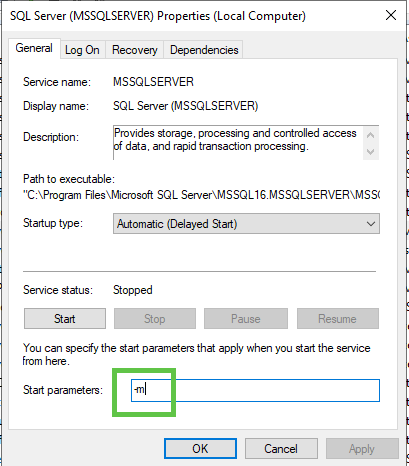
Start SQL Server in Single-User Mode:
- Open the SQL Server service properties (e.g., by double-clicking the service in Services).
- Go to the "Startup Parameters" tab.
- Add
-m(for single-user mode) to the existing startup parameters. If there are existing parameters, separate them with a semicolon. - Start the SQL Server service from there
-
Connect using
sqlcmd:- Open a new Command Prompt window as Administrator.
- Navigate to the SQL Server Binn directory (e.g.,
C:\Program Files\Microsoft SQL Server\MSSQLXX.MSSQLSERVER\MSSQL\Binn). - Connect to the SQL Server instance using
sqlcmdin single-user mode. For a default instance, use:
sqlcmd -S . -E -d master
sqlcmd -S . -U sa - P PASSWORD -d master
For a named instance, replace . with .\<InstanceName>
- Restore the
masterDatabase:- In the
sqlcmdprompt, execute the followingRESTORE DATABASEcommand, replacing<path_to_backup_file>with the actual path to yourmasterdatabase backup file:
- In the
RESTORE DATABASE master FROM DISK = '\\192.168.1.61\Backups\UNIBCESRV02\master\FULL\UNIBCESRV02_master_FULL_20250910_010011.bak' WITH REPLACE, RECOVERY;
RESTORE DATABASE model FROM DISK = '\\192.168.1.61\Backups\UNIBCESRV02\model\FULL\UNIBCESRV02_model_FULL_20250910_010013.bak' WITH REPLACE, RECOVERY;
RESTORE DATABASE msdb FROM DISK = '\\192.168.1.61\Backups\UNIBCESRV02\msdb\FULL\UNIBCESRV02_msdb_FULL_20250910_010014.bak' WITH REPLACE, RECOVERY;
Check integrity
DBCC CHECKDB ('master') WITH ALL_ERRORMSGS, EXTENDED_LOGICAL_CHECKS;- The
WITH REPLACEoption is crucial as it overwrites the existingmasterdatabase. - The
RECOVERYoption brings the database online after the restore. - Restart SQL Server in Normal Mode:
- After the restore completes and
sqlcmdindicates the instance is shutting down, stop the SQL Server service again. - Remove the
-mstartup parameter from the SQL Server service properties. - Start the SQL Server service normally.
- After the restore completes and
MsSQL - Restore Agent Jobs from Another MSDB database
This is to copy by specific Job
--- ErangaMSDB is the copy of the old msdb ---
DECLARE @JobID UNIQUEIDENTIFIER
DECLARE @SchedulerID Int
SELECT @JobID = job_id FROM ErangaMSDB.dbo.sysjobs WHERE NAME='Restore IPay'

--- Insert the jobs
INSERT msdb.dbo.sysjobs
SELECT * FROM ErangaMSDB.dbo.sysjobs
WHERE job_id=@JobID

--Insert the steps
INSERT msdb.dbo.sysjobsteps
SELECT * FROM ErangaMSDB.dbo.sysjobsteps
WHERE job_id=@JobID

--Insert the job history
SET IDENTITY_INSERT msdb.dbo.sysjobhistory ON
INSERT msdb.dbo.sysjobhistory
(instance_id,job_id,step_id,step_name,sql_message_id,sql_severity,
[message],run_status,run_date,run_time,run_duration,operator_id_emailed,
operator_id_netsent,operator_id_paged,retries_attempted,[server])
SELECT
instance_id,job_id,step_id,step_name,sql_message_id,sql_severity,
[message],run_status,run_date,run_time,run_duration,operator_id_emailed,
operator_id_netsent,operator_id_paged,retries_attempted,[server]
FROM ErangaMSDB.dbo.sysjobhistory
WHERE job_id=@JobID
SET IDENTITY_INSERT msdb.dbo.sysjobhistory OFF

--Insert the schedules
-- For the schedule - If more than 1 schedule, should add : WHERE schedule_id in (number1,number2)
SET IDENTITY_INSERT msdb.dbo.sysschedules ON

INSERT INTO msdb.dbo.sysschedules ( [schedule_id],[schedule_uid],[originating_server_id],[name],[owner_sid]
,[enabled],[freq_type],[freq_interval],[freq_subday_type],[freq_subday_interval]
,[freq_relative_interval],[freq_recurrence_factor],[active_start_date],[active_end_date]
,[active_start_time],[active_end_time],[date_created],[date_modified],[version_number]
)
SELECT [schedule_id],[schedule_uid],[originating_server_id],[name],[owner_sid]
,[enabled],[freq_type],[freq_interval],[freq_subday_type],[freq_subday_interval]
,[freq_relative_interval],[freq_recurrence_factor],[active_start_date],[active_end_date]
,[active_start_time],[active_end_time],[date_created],[date_modified],[version_number]
FROM ErangaMSDB.dbo.sysschedules
WHERE schedule_id =@SchedulerID

INSERT msdb.dbo.sysjobschedules
SELECT * FROM ErangaMSDB.dbo.sysjobschedules
WHERE job_id=@JobID
Came from Here
This is to copy all jobs
/**************************************Script to generate all the Jobs on a server **************************************/--CreatedBy - Amit Mathur (v-amat)
--CreatedDate - 08/26/2009
/**************************************Script to generate all the Jobs on a server **************************************/SET NOCOUNT ON
BEGIN TRY

PRINT 'USE [msdb]'
PRINT 'GO'
PRINT ''

DECLARE @JobID nvarchar(100),
        @JobName varchar (128),
        @JobCategory varchar (128),
        @JobCategoryClass varchar(128),
        @Now datetime,
        @Nowtext varchar(30)

    SELECT @Now = GETDATE()

    SELECT @Nowtext = CAST(@Now as varchar(30))


CREATE TABLE #Jobs (id int identity (1,1), jobid varchar(50))

INSERT INTO #Jobs (jobid) SELECT jobid = convert(varchar(50),job_id) FROM msdb.dbo.SysJobs WITH (NOLOCK)

DECLARE @MaxJobs int,
        @JobControl int
SELECT @JobControl = 1
SELECT @MaxJobs = MAX(id) FROM #jobs

--Create Jobs by looping through all the existing jobs on the server
WHILE (@JobControl <= @MaxJobs)
BEGIN --BEGIN Jobs

    SELECT @JobID = JobID FROM #jobs WHERE id = @JobControl

    SELECT @JobName = name FROM msdb.dbo.sysjobs_view WHERE Job_ID = @JobID
    SELECT @JobCategory =    sc.name, @JobCategoryClass = category_class FROM msdb.dbo.sysjobs sj
                            INNER JOIN msdb.dbo.syscategories sc
                            ON sc.category_id = sj.category_id
                            WHERE Job_ID = @JobID


    PRINT '/****** Object: Job ' + @JobName + ' Script Date:' + @Nowtext + ' ******/'
    PRINT 'IF EXISTS (SELECT job_id FROM msdb.dbo.sysjobs_view WHERE name = N''' + @JobName + ''')'
    PRINT 'EXEC msdb.dbo.sp_delete_job @job_name= N''' + @JobName + ''''+ ', @delete_unused_schedule=1'
    PRINT 'GO'
    PRINT ''
    PRINT '/****** Object: Job ' + @JobName + ' Script Date:' + @Nowtext + ' ******/'
    PRINT 'BEGIN TRANSACTION'
    PRINT 'DECLARE @ReturnCode INT'
    PRINT 'SELECT @ReturnCode = 0'
    PRINT '/****** Object: JobCategory ' + QUOTENAME(@JobCategory) + ' Script Date:' + @Nowtext + ' ******/'
    PRINT 'IF NOT EXISTS (SELECT name FROM msdb.dbo.syscategories WHERE name = N''' + @JobCategory + ''' AND category_class = ' + @JobCategoryClass+ ')'
    PRINT 'BEGIN'
    PRINT 'EXEC @ReturnCode = msdb.dbo.sp_add_category @class=N''JOB'', @type=N''LOCAL'', @name = N''' + @JobCategory + ''''
    PRINT 'IF (@@ERROR <> 0 OR @ReturnCode <> 0) GOTO QuitWithRollback'
    PRINT ''
    PRINT 'END'
    PRINT ''
    PRINT 'DECLARE @jobId BINARY(16)'
    PRINT ''
    DECLARE @enabled int,
            @notify_level_eventlog int,
            @notify_level_email int,
            @notify_level_netsend int,
            @notify_level_page int,
            @delete_level int,
            @description nvarchar(128),
            @category_name nvarchar(128),
            @owner_login_name nvarchar(128),
            @notify_email_operator_name nvarchar(128)

    SELECT     @enabled = sj.enabled,
            @notify_level_eventlog = sj.notify_level_eventlog,
            @notify_level_email = sj.notify_level_email,
            @notify_level_netsend = sj.notify_level_netsend,
            @notify_level_page = sj.notify_level_page,
            @delete_level = sj.delete_level,
            @description = sj.[description],
            @category_name = sc.name,
            @owner_login_name = SUSER_NAME(sj.owner_sid),
            @notify_email_operator_name = so.name
    FROM msdb.dbo.sysjobs sj
    INNER JOIN msdb.dbo.syscategories sc
        ON sc.category_id = sj.category_id
    LEFT OUTER JOIN msdb.dbo.sysoperators so
        ON sj.notify_email_operator_id = so.id
    WHERE Job_ID = @JobID

    PRINT 'EXEC @ReturnCode = msdb.dbo.sp_add_job @job_name = N''' + @JobName + ''','
    PRINT '        @enabled=' + CAST(@enabled as varchar(30))+ ','
    PRINT '        @notify_level_eventlog=' + CAST(@notify_level_eventlog as varchar(30))+ ','
    PRINT '        @notify_level_email=' + CAST(@notify_level_email as varchar(30))+ ','
    PRINT '        @notify_level_netsend=' + CAST(@notify_level_netsend as varchar(30))+ ','
    PRINT '        @notify_level_page=' + CAST(@notify_level_page as varchar(30))+ ','
    PRINT '        @delete_level=' + CAST(@delete_level as varchar(30))+ ','
    PRINT '        @description=N''' + REPLACE(@description, '''','''''') + ''','
    PRINT '        @category_name=N''' + @category_name + ''','
    PRINT '        @owner_login_name=N''' + ISNULL(@owner_login_name,'sa') + ''','
IF @notify_email_operator_name IS NOT NULL
BEGIN
    PRINT '        @notify_email_operator_name=N''' + @notify_email_operator_name + ''', @job_id = @JobID OUTPUT'
END
ELSE
    BEGIN
    PRINT '        @job_id = @JobID OUTPUT'
    END
    PRINT 'IF (@@ERROR <> 0 OR @ReturnCode <> 0) GOTO QuitWithRollback'
    PRINT ''
    --CREATE STEPS
    DECLARE @MaxSteps int,
            @LoopControl int
    SELECT @LoopControl = 1
    SELECT @MaxSteps = MAX(step_id) FROM msdb.dbo.sysjobsteps WHERE Job_ID = @JobID

    WHILE (@LoopControl <= @MaxSteps)
        BEGIN
            DECLARE @step_name nvarchar (128),
                    @step_id int,
                    @cmdexec_success_code int,
                    @on_success_action int,
                    @on_success_step_id int,
                    @on_fail_action int,
                    @on_fail_step_id int,
                    @retry_attempts int,
                    @retry_interval int,
                    @os_run_priority int,
                    @subsystem nvarchar (128),
                    @command nvarchar (max),
                    @database_name nvarchar(128),
                    @flags int

            SELECT     @step_name = step_name,
                    @step_id = step_id,
                    @cmdexec_success_code = cmdexec_success_code,
                    @on_success_action = on_success_action,
                    @on_success_step_id = on_success_step_id,
                    @on_fail_action = on_fail_action,
                    @on_fail_step_id = on_fail_step_id,
                    @retry_attempts = retry_attempts,
                    @retry_interval = retry_interval,
                    @os_run_priority = os_run_priority,
                    @subsystem = subsystem,
                    @command = command,
                    @database_name = database_name,
                    @flags = flags
            FROM msdb.dbo.sysjobsteps WHERE Job_ID = @JobID
            AND step_id = @LoopControl
            PRINT ''
            PRINT '/****** Object: Step ' + @step_name + ' Script Date: ' + @Nowtext + '******/'

            PRINT 'EXEC @ReturnCode = msdb.dbo.sp_add_jobstep @job_id=@jobId, @step_name=N''' + @step_name + ''','
            PRINT '        @step_id=' + CAST(@step_id as varchar(30))+ ','
            PRINT '        @cmdexec_success_code=' + CAST(@cmdexec_success_code as varchar(30))+ ','
            PRINT '        @on_success_action=' + CAST(@on_success_action as varchar(30))+ ','
            PRINT '        @on_success_step_id=' + CAST(@on_success_step_id as varchar(30))+ ','
            PRINT '        @on_fail_action=' + CAST(@on_fail_action as varchar(30))+ ','
            PRINT '        @on_fail_step_id=' + CAST(@on_fail_step_id as varchar(30))+ ','
            PRINT '        @retry_attempts=' + CAST(@retry_attempts as varchar(30))+ ','
            PRINT '        @retry_interval=' + CAST(@retry_interval as varchar(30))+ ','
            PRINT '        @os_run_priority=' + CAST(@os_run_priority as varchar(30))+ ', @subsystem=N''' + @subsystem + ''','
            PRINT '        @command=N''' + REPLACE(@command, '''','''''') + ''','
            PRINT '        @database_name=N''' + @database_name + ''','
            PRINT '        @flags=' + CAST(@flags as varchar(30))
            PRINT ''
            SELECT @LoopControl = @LoopControl + 1
        END -- End Steps While
    PRINT ''
    PRINT 'IF (@@ERROR <> 0 OR @ReturnCode <> 0) GOTO QuitWithRollback'
    PRINT 'EXEC @ReturnCode = msdb.dbo.sp_update_job @job_id = @jobId, @start_step_id = 1'
    PRINT 'IF (@@ERROR <> 0 OR @ReturnCode <> 0) GOTO QuitWithRollback'

    PRINT ''

    --CREATE SCHEDULES

    DECLARE @MaxSchedules int,
            @SchedulesLoopControl int
    SELECT @SchedulesLoopControl = 1

    CREATE TABLE #Schedules (id int identity (1,1), schedule_id int)

    INSERT INTO #Schedules (schedule_id) SELECT schedule_id = sjs.schedule_id
    FROM msdb.dbo.sysjobschedules sjs WITH (NOLOCK)
    --INNER JOIN msdb.dbo.sysschedules ss WITH (NOLOCK) ON sjs.schedule_id = ss.schedule_id
    WHERE sjs.Job_ID = @JobID

    SELECT @MaxSchedules = MAX(id) FROM #Schedules

    IF EXISTS (SELECT COUNT(*) FROM #Schedules)
    BEGIN
        WHILE (@SchedulesLoopControl <= @MaxSchedules)
            BEGIN
                DECLARE @name nvarchar(2000),
                        @sch_enabled int,
                        @freq_type int,
                        @freq_interval int,
                        @freq_subday_type int,
                        @freq_subday_interval int,
                        @freq_relative_interval int,
                        @freq_recurrence_factor int,
                        @active_start_date int,
                        @active_end_date int,
                        @active_start_time int,
                        @active_end_time int,
                        @schedule_uid nvarchar (50)

                SELECT     @name = name,
                        @sch_enabled = enabled,
                        @freq_type = freq_type,
                        @freq_interval = freq_interval,
                        @freq_subday_type = freq_subday_type,
                        @freq_subday_interval = freq_subday_interval,
                        @freq_relative_interval = freq_relative_interval,
                        @freq_recurrence_factor = freq_recurrence_factor,
                        @active_start_date = active_start_date,
                        @active_end_date = active_end_date,
                        @active_start_time = active_start_time,
                        @active_end_time = active_end_time,
                        @schedule_uid = schedule_uid
                        FROM msdb.dbo.sysjobschedules sjs WITH (NOLOCK)
                        INNER JOIN msdb.dbo.sysschedules ss WITH (NOLOCK) ON sjs.schedule_id = ss.schedule_id
                        INNER JOIN #Schedules s ON ss.schedule_id = s.schedule_id
                        WHERE sjs.Job_ID = @JobID
                        AND s.id = @SchedulesLoopControl

                PRINT 'EXEC @ReturnCode = msdb.dbo.sp_add_jobschedule @job_id=@jobId, @name=N''' + REPLACE(@name, '''','''''') + ''','
                PRINT '        @enabled=' + CAST(@sch_enabled as varchar(30))+ ','
                PRINT '        @freq_type=' + CAST(@freq_type as varchar(30))+ ','
                PRINT '        @freq_interval=' + CAST(@freq_interval as varchar(30))+ ','
                PRINT '        @freq_subday_type=' + CAST(@freq_subday_type as varchar(30))+ ','
                PRINT '        @freq_subday_interval=' + CAST(@freq_subday_interval as varchar(30))+ ','
                PRINT '        @freq_relative_interval=' + CAST(@freq_relative_interval as varchar(30))+ ','
                PRINT '        @freq_recurrence_factor=' + CAST(@freq_recurrence_factor as varchar(30))+ ','
                PRINT '        @active_start_date=' + CAST(@active_start_date as varchar(30))+ ','
                PRINT '        @active_end_date=' + CAST(@active_end_date as varchar(30))+ ','
                PRINT '        @active_start_time=' + CAST(@active_start_time as varchar (30)) + ','
                PRINT '        @active_end_time=' + CAST(@active_end_time as varchar (30)) + ','
                PRINT '        @schedule_uid=N''' + @schedule_uid + ''''
                PRINT ''

                PRINT ''
                PRINT 'IF (@@ERROR <> 0 OR @ReturnCode <> 0) GOTO QuitWithRollback'
                PRINT ''

                SELECT @SchedulesLoopControl = @SchedulesLoopControl + 1
            END -- End Schedules While loop
    END -- END IF (SELECT COUNT(*) FROM #Schedules) > 0

    DECLARE @server_name varchar(30)
    SELECT @server_name = CASE server_id WHEN 0 THEN 'local' ELSE 'Multi-Server' END
    FROM msdb.dbo.sysjobservers WHERE Job_ID = @JobID
    PRINT 'EXEC @ReturnCode = msdb.dbo.sp_add_jobserver @job_id = @jobId, @server_name =N''(' + @server_name + ')'''
    PRINT 'IF (@@ERROR <> 0 OR @ReturnCode <> 0) GOTO QuitWithRollback'
    PRINT 'COMMIT TRANSACTION'
    PRINT 'GOTO EndSave'
    PRINT 'QuitWithRollback:'
    PRINT ' IF (@@TRANCOUNT > 0) ROLLBACK TRANSACTION'
    PRINT 'EndSave:'
    PRINT ''
    PRINT 'GO'
    PRINT ''
    PRINT ''

    SELECT @JobControl = @JobControl + 1

    DROP TABLE #Schedules

END --End Jobs

DROP TABLE #Jobs

END TRY

BEGIN CATCH
    DROP TABLE #Jobs
    DROP TABLE #Schedules
END CATCH;
Came from here
SQL - Try Catch Rollback
BEGIN TRY
    BEGIN TRANSACTION;

    -- SQL statements that are part of the transaction
    -- e.g., INSERT, UPDATE, DELETE statements

    COMMIT TRANSACTION;
END TRY
BEGIN CATCH
    -- Error handling logic
    IF @@TRANCOUNT > 0
    BEGIN
        ROLLBACK TRANSACTION;
    END;

    -- Optional: Log error details, raise error, or perform other actions
    SELECT ERROR_MESSAGE() AS ErrorMessage,
           ERROR_SEVERITY() AS ErrorSeverity,
           ERROR_STATE() AS ErrorState,
           ERROR_LINE() AS ErrorLine,
           ERROR_PROCEDURE() AS ErrorProcedure;

    -- Optional: Re-throw the error
    -- THROW;
END CATCH;
SQL - Blocking Process
These scripts are using to help how to determine what is blocking process are occurring.
SELECT text,*
  FROM sys.dm_exec_requests
  CROSS APPLY sys.dm_exec_sql_text(sql_handle)
  WHERE DB_NAME(database_id) = '[dBName]'
    AND blocking_session_id <> 0
SELECT L.request_session_id AS SPID,
DB_NAME(L.resource_database_id) AS DatabaseName,
O.Name AS LockedObjectName,
P.object_id AS LockedObjectId,
L.resource_type AS LockedResource,
L.request_mode AS LockType,
ST.text AS SqlStatementText,
ES.login_name AS LoginName,
ES.host_name AS HostName,
TST.is_user_transaction as IsUserTransaction,
AT.name as TransactionName,
CN.auth_scheme as AuthenticationMethod
FROM sys.dm_tran_locks L
JOIN sys.partitions P ON P.hobt_id = L.resource_associated_entity_id
JOIN sys.objects O ON O.object_id = P.object_id
JOIN sys.dm_exec_sessions ES ON ES.session_id = L.request_session_id
JOIN sys.dm_tran_session_transactions TST ON ES.session_id = TST.session_id
JOIN sys.dm_tran_active_transactions AT ON TST.transaction_id = AT.transaction_id
JOIN sys.dm_exec_connections CN ON CN.session_id = ES.session_id
CROSS APPLY sys.dm_exec_sql_text(CN.most_recent_sql_handle) AS ST
WHERE resource_database_id = db_id()
ORDER BY L.request_session_id;
GOSELECT * FROM sys.dm_exec_input_buffer (66,0);
GOWITH cteBL (session_id, blocking_these) AS
(SELECT s.session_id, blocking_these = x.blocking_these FROM sys.dm_exec_sessions s
CROSS APPLY (SELECT isnull(convert(varchar(6), er.session_id),'') + ', '
FROM sys.dm_exec_requests as er
WHERE er.blocking_session_id = isnull(s.session_id ,0)
AND er.blocking_session_id <> 0
FOR XML PATH('') ) AS x (blocking_these)
)
SELECT s.session_id, blocked_by = r.blocking_session_id, bl.blocking_these
, batch_text = t.text, input_buffer = ib.event_info, *
FROM sys.dm_exec_sessions s
LEFT OUTER JOIN sys.dm_exec_requests r on r.session_id = s.session_id
INNER JOIN cteBL as bl on s.session_id = bl.session_id
OUTER APPLY sys.dm_exec_sql_text (r.sql_handle) t
OUTER APPLY sys.dm_exec_input_buffer(s.session_id, NULL) AS ib
WHERE blocking_these is not null or r.blocking_session_id > 0
ORDER BY len(bl.blocking_these) desc, r.blocking_session_id desc, r.session_id;
GOWITH cteHead ( session_id,request_id,wait_type,wait_resource,last_wait_type,is_user_process,request_cpu_time
,request_logical_reads,request_reads,request_writes,wait_time,blocking_session_id,memory_usage
,session_cpu_time,session_reads,session_writes,session_logical_reads
,percent_complete,est_completion_time,request_start_time,request_status,command
,plan_handle,sql_handle,statement_start_offset,statement_end_offset,most_recent_sql_handle
,session_status,group_id,query_hash,query_plan_hash)
AS ( SELECT sess.session_id, req.request_id, LEFT (ISNULL (req.wait_type, ''), 50) AS 'wait_type'
, LEFT (ISNULL (req.wait_resource, ''), 40) AS 'wait_resource', LEFT (req.last_wait_type, 50) AS 'last_wait_type'
, sess.is_user_process, req.cpu_time AS 'request_cpu_time', req.logical_reads AS 'request_logical_reads'
, req.reads AS 'request_reads', req.writes AS 'request_writes', req.wait_time, req.blocking_session_id,sess.memory_usage
, sess.cpu_time AS 'session_cpu_time', sess.reads AS 'session_reads', sess.writes AS 'session_writes', sess.logical_reads AS 'session_logical_reads'
, CONVERT (decimal(5,2), req.percent_complete) AS 'percent_complete', req.estimated_completion_time AS 'est_completion_time'
, req.start_time AS 'request_start_time', LEFT (req.status, 15) AS 'request_status', req.command
, req.plan_handle, req.[sql_handle], req.statement_start_offset, req.statement_end_offset, conn.most_recent_sql_handle
, LEFT (sess.status, 15) AS 'session_status', sess.group_id, req.query_hash, req.query_plan_hash
FROM sys.dm_exec_sessions AS sess
LEFT OUTER JOIN sys.dm_exec_requests AS req ON sess.session_id = req.session_id
LEFT OUTER JOIN sys.dm_exec_connections AS conn on conn.session_id = sess.session_id
)
, cteBlockingHierarchy (head_blocker_session_id, session_id, blocking_session_id, wait_type, wait_duration_ms,
wait_resource, statement_start_offset, statement_end_offset, plan_handle, sql_handle, most_recent_sql_handle, [Level])
AS ( SELECT head.session_id AS head_blocker_session_id, head.session_id AS session_id, head.blocking_session_id
, head.wait_type, head.wait_time, head.wait_resource, head.statement_start_offset, head.statement_end_offset
, head.plan_handle, head.sql_handle, head.most_recent_sql_handle, 0 AS [Level]
FROM cteHead AS head
WHERE (head.blocking_session_id IS NULL OR head.blocking_session_id = 0)
AND head.session_id IN (SELECT DISTINCT blocking_session_id FROM cteHead WHERE blocking_session_id != 0)
UNION ALL
SELECT h.head_blocker_session_id, blocked.session_id, blocked.blocking_session_id, blocked.wait_type,
blocked.wait_time, blocked.wait_resource, h.statement_start_offset, h.statement_end_offset,
h.plan_handle, h.sql_handle, h.most_recent_sql_handle, [Level] + 1
FROM cteHead AS blocked
INNER JOIN cteBlockingHierarchy AS h ON h.session_id = blocked.blocking_session_id and h.session_id!=blocked.session_id --avoid infinite recursion for latch type of blocking
WHERE h.wait_type COLLATE Latin1_General_BIN NOT IN ('EXCHANGE', 'CXPACKET') or h.wait_type is null
)
SELECT bh.*, txt.text AS blocker_query_or_most_recent_query
FROM cteBlockingHierarchy AS bh
OUTER APPLY sys.dm_exec_sql_text (ISNULL ([sql_handle], most_recent_sql_handle)) AS txt;
GOSELECT [s_tst].[session_id],
[database_name] = DB_NAME (s_tdt.database_id),
[s_tdt].[database_transaction_begin_time],
[sql_text] = [s_est].[text]
FROM sys.dm_tran_database_transactions [s_tdt]
INNER JOIN sys.dm_tran_session_transactions [s_tst] ON [s_tst].[transaction_id] = [s_tdt].[transaction_id]
INNER JOIN sys.dm_exec_connections [s_ec] ON [s_ec].[session_id] = [s_tst].[session_id]
CROSS APPLY sys.dm_exec_sql_text ([s_ec].[most_recent_sql_handle]) AS [s_est];
GOLinks
Microsoft
MySQL - Cannot use select on user table
ERROR 1356 (HY000): View 'mysql.user' references invalid table(s) or column(s) or function(s) or definer/invoker of view lack rights to use them
Looks like database is corrupted. Try the following workaround:
1. Insert missing privileges:
Code:
INSERT INTO `tables_priv` (`Host`, `Db`, `User`, `Table_name`, `Grantor`, `Timestamp`, `Table_priv`, `Column_priv`) VALUES ('localhost','mysql','mariadb.sys','global_priv','root@localhost','0000-00-00 00:00:00','Select,Delete','');2. Restart MariaDB to apply security changes:
systemctl restart mariadb3. Verify that select works now:
mysql
select * from mysql.user;
Postgres - Install on Redhat 9
**To install the `pgvector` extension** (the popular open-source vector similarity search extension for PostgreSQL, which provides the `vector` data type and operators) on **Red Hat Enterprise Linux (RHEL) 9** with **PostgreSQL 16**, follow these steps.
**`vector.control`** is the control file that comes bundled with the `pgvector` extension — it's not a separate extension. The extension name is simply **`vector`**.
### Recommended Method: Install via PGDG Repository (Easiest & Recommended)
The official PostgreSQL Yum Repository (PGDG) provides pre-built RPM packages for `pgvector` on RHEL 9.
1. **Add the official PostgreSQL repository** (if not already added):
```bash
sudo dnf install -y https://download.postgresql.org/pub/repos/yum/reporpms/EL-9-x86_64/pgdg-redhat-repo-latest.noarch.rpm
```
2. **Disable the built-in RHEL PostgreSQL module** (to avoid conflicts):
```bash
sudo dnf -qy module disable postgresql
```
3. **Install PostgreSQL 16** (if not already installed):
```bash
sudo dnf install -y postgresql16-server postgresql16-devel
```
- Initialize the database (only if this is a fresh install):
```bash
sudo /usr/pgsql-16/bin/postgresql-16-setup initdb
sudo systemctl enable --now postgresql-16
```
4. **Install pgvector for PostgreSQL 16**:
```bash
sudo dnf install -y pgvector_16
```
This installs the extension files (including `vector.control`, `vector--*.sql`, and `vector.so`) into the correct PostgreSQL 16 directories.
### Alternative: Compile from Source (if you prefer or need a specific version)
If the RPM is not available or you want the latest development version:
1. Install dependencies:
```bash
sudo dnf install -y git make gcc postgresql16-devel
```
2. Clone and build:
```bash
cd /tmp
git clone --branch v0.8.1 https://github.com/pgvector/pgvector.git
cd pgvector
make
sudo make install
```
(Use the latest tag from https://github.com/pgvector/pgvector/releases instead of `v0.8.1` if desired.)
### Enable the Extension in Your Database
1. Connect to your PostgreSQL 16 database (as superuser):
```bash
sudo -u postgres psql
```
Or connect to a specific database:
```bash
psql -U postgres -d your_database_name
```
2. Create the extension (run this in every database where you want to use vectors):
```sql
CREATE EXTENSION IF NOT EXISTS vector;
```
3. Verify it's installed:
```sql
\dx
```
You should see `vector` listed.
Or check the version:
```sql
SELECT vector_version();
```
### Troubleshooting Tips
- If you get `could not load library "/usr/pgsql-16/lib/vector.so"`, verify the file exists and has correct permissions.
- If using a custom PostgreSQL install, ensure `pg_config` points to the right version.
- For multiple PostgreSQL versions, always use the `_16` suffix in package names (e.g., `pgvector_16`).
This should get you up and running with vector support on PostgreSQL 16 on RHEL 9. Let me know if you run into any errors!
MySQL - my.cnf Tweaking
performance_schema = ON
tmpdir = /run/mariadb
thread_cache_size = 4
table_open_cache = 16384
table_definition_cache = 8384
sql_mode = ERROR_FOR_DIVISION_BY_ZERO,NO_AUTO_CREATE_USER,NO_ENGINE_SUBSTITUTION

query_cache_type = 0
query_cache_size = 0
query_cache_limit = 128M
query_cache_strip_comments = 1

tmp_table_size = 512M
max_heap_table_size = 512M

max_connections = 750
max_allowed_packet = 24M
sort_buffer_size = 24M
join_buffer_size = 48M

innodb_buffer_pool_size = 65G		# 65-75% of RAM for InnoDB cache --> Keeping some for VUE
innodb_buffer_pool_instances = 10	# One instance per CPU core --> Keeping some for VUE
innodb_flush_method = O_DIRECT		# Reduce I/O overhead
innodb_flush_log_at_trx_commit = 2	# Balance performance and durability
innodb_log_buffer_size = 16M		# Buffer for transaction logs
innodb_thread_concurrency = 0		# Let MySQL manage threads (0 = unlimited)
innodb_io_capacity = 2000		# Adjust based on storage IOPS
innodb_io_capacity_max = 4000		# Max IOPS for bursts
innodb_use_native_aio = 1
innodb_flush_log_at_trx_commit = 2	# Balance performance and durability --> Changed from 0
innodb_file_per_table
innodb_log_file_size = 2G		# Larger logs for better write performance --> Changed from 512
MongoDB - Installation on RedHat 9
Step 1: Configure the MongoDB Repository
/etc/yum.repos.d/mongodb-org-7.0.repo using your preferred text editor (like vi or nano), or by using the cat command as shown below. This example uses version 7.0; you can check the MongoDB repositories for the latest version.cat <<EOF | sudo tee /etc/yum.repos.d/mongodb-org-7.0.repo
[mongodb-org-7.0]
name=MongoDB Repository
baseurl=https://repo.mongodb.org/yum/redhat/9/mongodb-org/7.0/x86_64/
gpgcheck=1
enabled=1
gpgkey=https://pgp.mongodb.com/server-7.0.asc
EOFStep 2: Install MongoDB Packages
Install the latest stable version of MongoDB:
sudo dnf install -y mongodb-orgStep 3: Start and Enable the MongoDB Service
Start the service and enable it to run on boot:
sudo systemctl start mongod
sudo systemctl enable mongod
# Verify status:
sudo systemctl status mongod
Step 4: Configure the Firewall (Optional)
If needed, open port 27017 to allow remote access:
sudo firewall-cmd --permanent --add-port=27017/tcp
sudo firewall-cmd --reload
Step 5: Begin Using MongoDB
Launch the shell to connect to your local instance:
mongosh
Redis - Installation on RedHat 9
Install the Latest Version using the Remi Repository
- Install the Remi repository configuration package:
sudo dnf install -y https://rpms.remirepo.net/enterprise/remi-release-9.rpm - Enable the specific Redis module stream (e.g., Redis 7.2) from the Remi repository:
sudo dnf module enable redis:remi-7.2 -y - Install Redis:
sudo dnf install -y redis - Start and enable the Redis service:
sudo systemctl enable --now redis
SQLLite - Installation on RedHat 9
-
Install
The system will prompt you to confirm the installation. Typesudo dnf install sqliteyand pressEnterto proceed. - Verify the installation: After the installation is complete, you can verify it by checking the installed SQLite version.
sqlite3 --version - Install development tools (optional): If you plan to compile other software or programming language bindings that require SQLite development headers (e.g., for Python or Ruby bindings), you may also need the
sqlite-develpackage.
sudo dnf install sqlite-devel
MsSQL - Performance Script and Monitoring Scripts
High usage
SELECT TOP 10
    qs.total_worker_time AS [Total CPU Time (ms)],
    qs.execution_count AS [Execution Count],
    qs.total_worker_time / qs.execution_count AS [Avg CPU Time (ms)],
    qs.total_elapsed_time / qs.execution_count AS [Avg Elapsed Time (ms)],
    qs.total_logical_reads / qs.execution_count AS [Avg Logical Reads],
    SUBSTRING(st.text, (qs.statement_start_offset/2) + 1,
        ((CASE qs.statement_end_offset
            WHEN -1 THEN DATALENGTH(st.text)
            ELSE qs.statement_end_offset
        END - qs.statement_start_offset)/2) + 1) AS [Query Text],
    qp.query_plan AS [Query Plan]
FROM sys.dm_exec_query_stats qs
CROSS APPLY sys.dm_exec_sql_text(qs.sql_handle) st
CROSS APPLY sys.dm_exec_query_plan(qs.plan_handle) qp
ORDER BY qs.total_worker_time DESC;
SQL Messages
SELECT sql_message_id, message, run_date, run_time
FROM msdb.dbo.sysjobhistory h
JOIN msdb.dbo.sysjobsteps s ON h.job_id = s.job_id AND h.step_id = s.step_id
WHERE h.job_id = (SELECT job_id FROM msdb.dbo.sysjobs WHERE name = '_MAINT_DatabaseBackup - USER_DATABASES - FULL')
ORDER BY run_date DESC, run_time DESC;
Postgres - Useful Commands
Create a file to store login and password
cd /root
vi .pgpass| localhost:5432:*:postgres:password1 localhost:5433:*:postgres:password1 |
#Use Postgres
sudo -p 5432 -u postgres psql
#Tests the conntection
sudo psql -h localhost -p 5432 -U postgres -c '\conninfo'
#Resets password
sudo -u postgres /usr/pgsql-16/bin/psql -p 5432 -c "ALTER ROLE postgres PASSWORD 'password1'"
sudo -u postgres /usr/pgsql-17/bin/psql -p 5433 -c "ALTER ROLE postgres PASSWORD 'password1'"